cancel
Showing results for 
Search instead for 
Did you mean: 

Try your skills in the Power BI Dataviz World Championship! Round one ends June 26. Join now

Reply
techvidya
Frequent Visitor

Split Rows of Table

Hey guys,


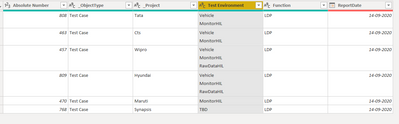
Looking for a solution for below Requirement , I have my table like as shown in below image

techvidya_0-1600861759890.png

I have multiple values in Rows of Test Environment COlumn, i want to split those values into multiple Rows . Please help me to achieve this.


Thanks In Advance

1 ACCEPTED SOLUTION
FrankAT
Community Champion
Community Champion

Hi @techvidya 

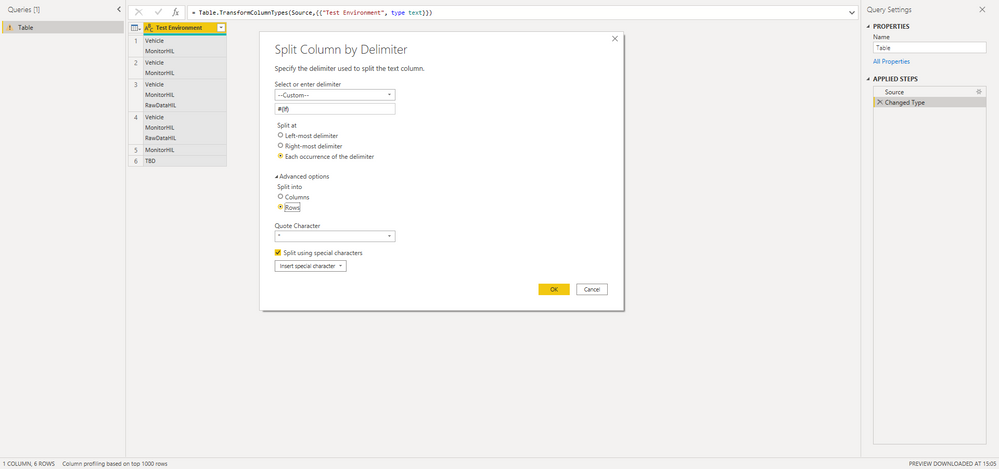
try the following transformation in Power Query:


23-09-_2020_15-06-34.png

With kind regards from the town where the legend of the 'Pied Piper of Hamelin' is at home
FrankAT (Proud to be a Datanaut)

View solution in original post

3 REPLIES 3
FrankAT
Community Champion
Community Champion

Hi @techvidya 

try the following transformation in Power Query:


23-09-_2020_15-06-34.png

With kind regards from the town where the legend of the 'Pied Piper of Hamelin' is at home
FrankAT (Proud to be a Datanaut)

amitchandak
Super User
Super User

@techvidya , You can split by delimiter. There is an option on right-click.

https://www.tutorialgateway.org/how-to-split-columns-in-power-bi/

Share with Power BI Enthusiasts: Full Power BI Video (20 Hours) YouTube
Microsoft Fabric Series 60+ Videos YouTube
Microsoft Fabric Hindi End to End YouTube
HotChilli
Community Champion
Community Champion

I think you should be able to right-click and Split Column by Delimiter.

Power Query should recognise a custom character (like line feed).

Use the Advanced option and split to Rows.

Helpful resources

Announcements
Fabric Data Days is here Carousel

Data Days 2026

Don't miss out on Data Days, June 15 through August 7. Learn Fabric, Power BI, SQL, AI and more.

Power BI DataViz World Championships carousel

Power BI DataViz World Championships - June 2026

A new Power BI DataViz World Championship is coming this June! Don't miss out on submitting your entry.