cancel
Showing results for 
Search instead for 
Did you mean: 

July 7 - July 17 | Round 2 of the Power BI Dataviz World Championships. Don't miss your chance! Learn more

Reply
JQuon
Helper I
Helper I

Source Data Columns Expanding

The source data of my  Power BI reports comes from 2 separate access tables and is setup so it can be easily refreshed.  I've added 4 columns to table 1 in Power BI (DAX formula driven) that is required for my reporting. 


If the source data of table 1 expands 2 columns, will Power BI just shift columns I added to make room for the new columns in the source data? Or will it put the extra source data columns after the columns I added in PowerBI?

1 ACCEPTED SOLUTION
v-piga-msft
Resident Rockstar
Resident Rockstar

Hi @JQuon


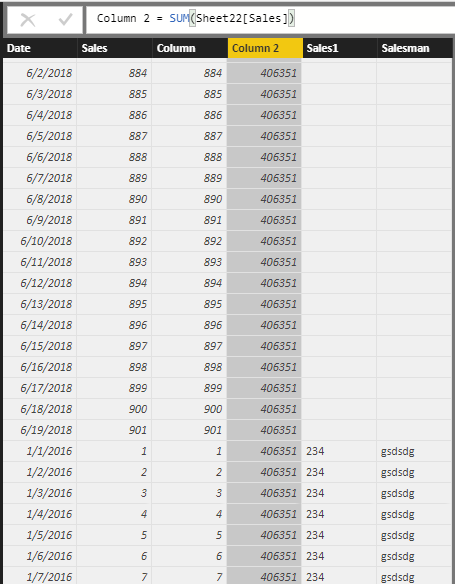
I have made a test based on your description, It seems that the two columns  you added in source data will be put after the calculated column you creaed in Power BI.


Capture.PNG


If you need further help, please feel free to ask.


Best Regards,

Cherry

Community Support Team _ Cherry Gao
If this post helps, then please consider Accept it as the solution to help the other members find it more quickly.

View solution in original post

2 REPLIES 2
v-piga-msft
Resident Rockstar
Resident Rockstar

Hi @JQuon


I have made a test based on your description, It seems that the two columns  you added in source data will be put after the calculated column you creaed in Power BI.


Capture.PNG


If you need further help, please feel free to ask.


Best Regards,

Cherry

Community Support Team _ Cherry Gao
If this post helps, then please consider Accept it as the solution to help the other members find it more quickly.

I appreciate you running the test.  I ran a test as well, but received different results and it's possible it's because of my data settings.  For some reason the table only refreshes with the columns that were initially imported and anything added to the source data does not show up.


I previously changed my data settings because I would recieve error messages while trying to refresh my tables from the Access database.  I'll with a fresh file.


Thanks!

Helpful resources

Announcements
FabCon and SQLCon Barcelona 2026

FabCon & SQLCon – Barcelona 2026

Join us in Barcelona for FabCon and SQLCon, the Fabric, Power BI, SQL, and AI community event. Save €200 with code FABCMTY200.

July Power BI Update Carousel

Power BI Monthly Update - July 2026

Check out the July 2026 Power BI update to learn about new features.

60 days of Data Days Carousel

Data Days 2026

Join Data Days 2026: 60 days of free live/on-demand sessions, challenges, study groups, and certification opportunities.

Power BI DataViz World Championships carousel

Power BI DataViz World Championships - June 2026

A new Power BI DataViz World Championship is coming this June! Don't miss out on submitting your entry.

Top Solution Authors