Join us at FabCon Atlanta from March 16 - 20, 2026, for the ultimate Fabric, Power BI, AI and SQL community-led event. Save $200 with code FABCOMM.
Register now!The Power BI Data Visualization World Championships is back! Get ahead of the game and start preparing now! Learn more
The source data of my Power BI reports comes from 2 separate access tables and is setup so it can be easily refreshed. I've added 4 columns to table 1 in Power BI (DAX formula driven) that is required for my reporting.
If the source data of table 1 expands 2 columns, will Power BI just shift columns I added to make room for the new columns in the source data? Or will it put the extra source data columns after the columns I added in PowerBI?
Solved! Go to Solution.
Hi @JQuon,
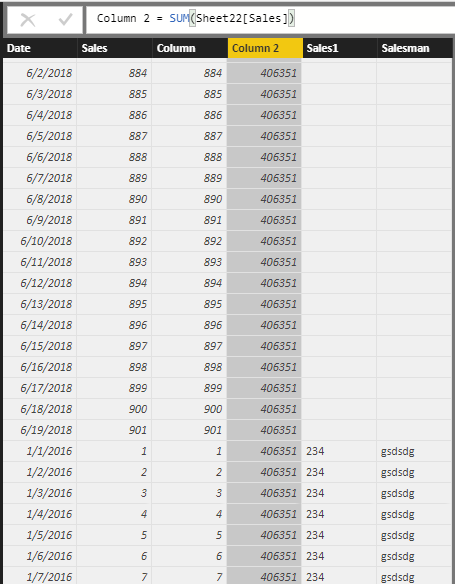
I have made a test based on your description, It seems that the two columns you added in source data will be put after the calculated column you creaed in Power BI.
If you need further help, please feel free to ask.
Best Regards,
Cherry
Hi @JQuon,
I have made a test based on your description, It seems that the two columns you added in source data will be put after the calculated column you creaed in Power BI.
If you need further help, please feel free to ask.
Best Regards,
Cherry
I appreciate you running the test. I ran a test as well, but received different results and it's possible it's because of my data settings. For some reason the table only refreshes with the columns that were initially imported and anything added to the source data does not show up.
I previously changed my data settings because I would recieve error messages while trying to refresh my tables from the Access database. I'll with a fresh file.
Thanks!
The Power BI Data Visualization World Championships is back! Get ahead of the game and start preparing now!
| User | Count |
|---|---|
| 68 | |
| 45 | |
| 43 | |
| 36 | |
| 23 |
| User | Count |
|---|---|
| 196 | |
| 126 | |
| 106 | |
| 78 | |
| 55 |