cancel
Showing results for 
Search instead for 
Did you mean: 

Learn from the best! Meet the four finalists headed to the FINALS of the Power BI Dataviz World Championships! Register now

Reply
JQuon
Helper I
Helper I

Source Data Columns Expanding

The source data of my  Power BI reports comes from 2 separate access tables and is setup so it can be easily refreshed.  I've added 4 columns to table 1 in Power BI (DAX formula driven) that is required for my reporting. 


If the source data of table 1 expands 2 columns, will Power BI just shift columns I added to make room for the new columns in the source data? Or will it put the extra source data columns after the columns I added in PowerBI?

1 ACCEPTED SOLUTION
v-piga-msft
Resident Rockstar
Resident Rockstar

Hi @JQuon


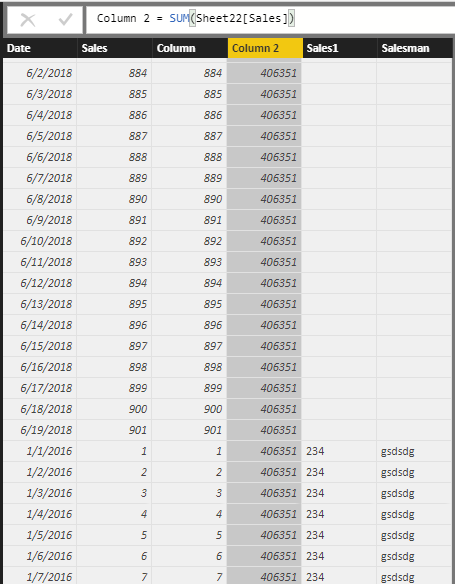
I have made a test based on your description, It seems that the two columns  you added in source data will be put after the calculated column you creaed in Power BI.


Capture.PNG


If you need further help, please feel free to ask.


Best Regards,

Cherry

Community Support Team _ Cherry Gao
If this post helps, then please consider Accept it as the solution to help the other members find it more quickly.

View solution in original post

2 REPLIES 2
v-piga-msft
Resident Rockstar
Resident Rockstar

Hi @JQuon


I have made a test based on your description, It seems that the two columns  you added in source data will be put after the calculated column you creaed in Power BI.


Capture.PNG


If you need further help, please feel free to ask.


Best Regards,

Cherry

Community Support Team _ Cherry Gao
If this post helps, then please consider Accept it as the solution to help the other members find it more quickly.

I appreciate you running the test.  I ran a test as well, but received different results and it's possible it's because of my data settings.  For some reason the table only refreshes with the columns that were initially imported and anything added to the source data does not show up.


I previously changed my data settings because I would recieve error messages while trying to refresh my tables from the Access database.  I'll with a fresh file.


Thanks!

Helpful resources

Announcements
Join our Fabric User Panel

Join our Fabric User Panel

Share feedback directly with Fabric product managers, participate in targeted research studies and influence the Fabric roadmap.

February Power BI Update Carousel

Power BI Monthly Update - February 2026

Check out the February 2026 Power BI update to learn about new features.

FabCon Atlanta 2026 carousel

FabCon Atlanta 2026

Join us at FabCon Atlanta, March 16-20, for the ultimate Fabric, Power BI, AI and SQL community-led event. Save $200 with code FABCOMM.