This time we’re going bigger than ever. Fabric, Power BI, SQL, AI and more. We're covering it all. You won't want to miss it.
Learn moreDid you hear? There's a new SQL AI Developer certification (DP-800). Start preparing now and be one of the first to get certified. Register now
Hi all,
First of all, my apology since I have seen the same question had been posted numerous times and all answers are leading to creating new index/sort column, however I cannot seem to replicate the result for whatever reasons.
Here I have a simple table with year and index columns and all I wanted to do is just to sort the year descending.
Help appreciated.
Hcze
Solved! Go to Solution.
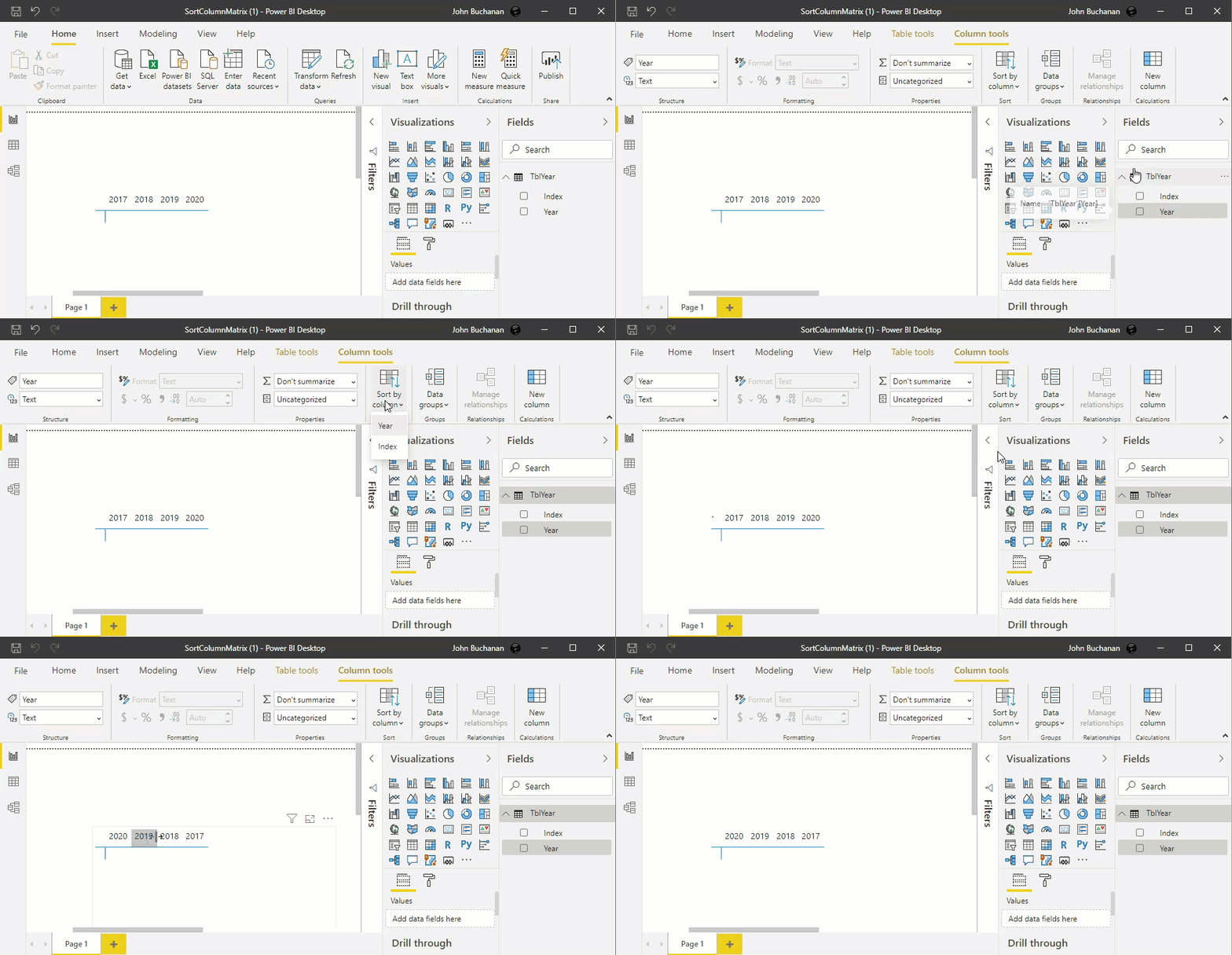
You just have to tell PowerBI to sort your year column by your index column:
Thanks for sharing… check out the links below. It provides a comprehensive guide on how to sort measures as columns
in a matrix visual.
https://insurancedatainsights.blog/2024/04/27/dax-topn-brokers-and-others/
@hcze , On Matrix column there is not sorting available. It means your default sorting will stay. And that is Ascending. The way to do is create a Year Desc Rank Like this
Assume you have Year column in date table
Year = Year([Date]) // Similar formula -- This is column you alredy have
Year1 = Year([Date]) // new column to avoid circular depndencies
Year Rank = Rankx(All(Date),[Year1],,Desc,Dense) // Desc sort
Mark Year Rank sort column of Year.
https://docs.microsoft.com/en-us/power-bi/desktop-sort-by-column
Thank you so much! I was under impression that the sorting applied to the whole table but apparently not. I have to click on Year column and sort by Index rather than click on Index column and sort by Index.
The gif is a nice touch and shows small details which otherwise missed!
Check out the April 2026 Power BI update to learn about new features.
Sign up to receive a private message when registration opens and key events begin.
If you have recently started exploring Fabric, we'd love to hear how it's going. Your feedback can help with product improvements.
| User | Count |
|---|---|
| 34 | |
| 31 | |
| 25 | |
| 20 | |
| 16 |
| User | Count |
|---|---|
| 61 | |
| 49 | |
| 28 | |
| 23 | |
| 23 |