cancel
Showing results for 
Search instead for 
Did you mean: 

The Power BI Data Visualization World Championships is back! Get ahead of the game and start preparing now! Learn more

Reply
BedhiafiAmira
Frequent Visitor

Sort a matrix without adding the column

I have the following Matrix :


BedhiafiAmira_0-1662287795521.png


My measure is like below : 


Total_Sales = SUMX ( FactSales, FactSales[SalesQuantity] * FactSales[UnitPrice] )
 
and my DimDate contains :
  • CalendarMonthLabel
  • CalendarYear
  • CalendarMonthNumber which enables me to sort the result

How can I sort the matrix based on the CalendarMonthNumber and displaying only the CalendarMonthLabel ?

1 ACCEPTED SOLUTION
PijushRoy
Super User
Super User

Hi @BedhiafiAmira 

As I saw, your month now sort as per Alphabetic order
So you need to create a calculated column in your DimDate table, please change DAX as per your month column name

MONTH_SORT = 
Switch(
True(),
Month = "January",1,
Month = "February",2,
Month = "March",3,
Month = "April",4,
Month = "May",5,
Month = "June",6,
Month = "July",7,
Month = "August",8,
Month = "September",9,
Month = "October",10,
Month = "November",11,
Month = "December",12)

 I used calendar month scquence, if your year start from June, so you need to put June as 1 


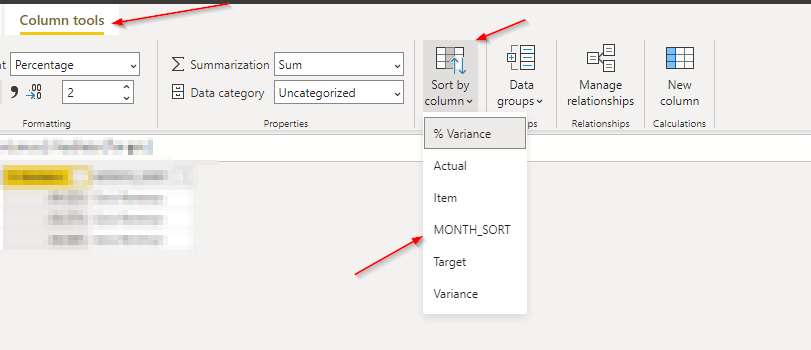
Then click on your MONTH column and select SORT_MONTH column 
01.png


Now click on table matrix visual change sory by month column

If solve your requirement, please mark this answer as SOLUTION
If this comment helps you, please LIKE this comment/Kudos


Did I answer your question? Mark my post as a solution!
Appreciate your Like/Kudos

Proud to be a Super User!


View solution in original post

4 REPLIES 4
PijushRoy
Super User
Super User

Hi @BedhiafiAmira 

As I saw, your month now sort as per Alphabetic order
So you need to create a calculated column in your DimDate table, please change DAX as per your month column name

MONTH_SORT = 
Switch(
True(),
Month = "January",1,
Month = "February",2,
Month = "March",3,
Month = "April",4,
Month = "May",5,
Month = "June",6,
Month = "July",7,
Month = "August",8,
Month = "September",9,
Month = "October",10,
Month = "November",11,
Month = "December",12)

 I used calendar month scquence, if your year start from June, so you need to put June as 1 


Then click on your MONTH column and select SORT_MONTH column 
01.png


Now click on table matrix visual change sory by month column

If solve your requirement, please mark this answer as SOLUTION
If this comment helps you, please LIKE this comment/Kudos


Did I answer your question? Mark my post as a solution!
Appreciate your Like/Kudos

Proud to be a Super User!


I had to use another calculated column : 

MonthNameToBeUsedInSorting = DimDate[CalendarMonthLabel] 
 As I was using month name in creating the sort column I can not use that as a sort column

I am getting a circular dependency when I try to sort the month by the calculated column.

tamerj1
Super User
Super User

Hi @BedhiafiAmira 

from the table view select the month label column and click on "sort by column". From the drop down list select "month number". 

Helpful resources

Announcements
Power BI DataViz World Championships

Power BI Dataviz World Championships

The Power BI Data Visualization World Championships is back! Get ahead of the game and start preparing now!

December 2025 Power BI Update Carousel

Power BI Monthly Update - December 2025

Check out the December 2025 Power BI Holiday Recap!

FabCon Atlanta 2026 carousel

FabCon Atlanta 2026

Join us at FabCon Atlanta, March 16-20, for the ultimate Fabric, Power BI, AI and SQL community-led event. Save $200 with code FABCOMM.