Don't miss your chance to take the Fabric Data Engineer (DP-600) exam for FREE! Find out how by attending the DP-600 session on April 23rd (pacific time), live or on-demand.
Learn moreNext up in the FabCon + SQLCon recap series: The roadmap for Microsoft SQL and Maximizing Developer experiences in Fabric. All sessions are available on-demand after the live show. Register now
Hi Guys,
I'll appreciate it if someone can help me with this.
I created a new column on my table with a switch function that shows 0-7 days, 7-14 days etc for when days old < 7, < 14 etc.
The issue is that my report matrix is not sorting this appropriately as 7-14 days comes first before 0-7 days.
I created another column which I called order to see if I can have integers in this column and then sort by this column.
The Dax I used is this:
SWITCH(
TRUE(),
Data[Total Days] = "0-7Days", "1",
Data[Total Days] = "7-14Days" ,"2",
Data[Total Days] = "14-21 Days","3"
Data[Total Days] = "21 Days+", 4)
But only the 21 days rows are showing 4. Others are blank.
What am I doing wrong?
Solved! Go to Solution.
Thanks. The conditional column solved this for me
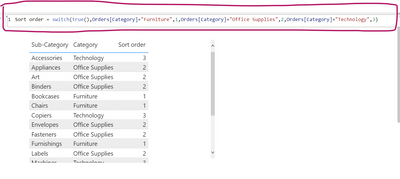
Switch() works for me without double quotes for 1,2,3,....
You can add a conditional column in Power query as shown below. hope this helps
Thanks. The conditional column solved this for me
Hi!
Right now your 4 is written as a number while the other numbers are strings due to the "" around them (e.g. "3"). If you change it so it says 1, 2, 3 and 4 instead of "1", "2", "3" and 4 you should be able to see all as numbers and be able to sort by that column.
I actually omitted the string in the "4" here as a mistake as they all appear as strings. Even when I removed the strings in all the numbers, only 4 still appears.
If you have recently started exploring Fabric, we'd love to hear how it's going. Your feedback can help with product improvements.
A new Power BI DataViz World Championship is coming this June! Don't miss out on submitting your entry.
| User | Count |
|---|---|
| 47 | |
| 43 | |
| 39 | |
| 20 | |
| 15 |
| User | Count |
|---|---|
| 68 | |
| 68 | |
| 31 | |
| 27 | |
| 24 |