Join us at FabCon Atlanta from March 16 - 20, 2026, for the ultimate Fabric, Power BI, AI and SQL community-led event. Save $200 with code FABCOMM.
Register now!The Power BI Data Visualization World Championships is back! Get ahead of the game and start preparing now! Learn more
Hi Guys,
I'll appreciate it if someone can help me with this.
I created a new column on my table with a switch function that shows 0-7 days, 7-14 days etc for when days old < 7, < 14 etc.
The issue is that my report matrix is not sorting this appropriately as 7-14 days comes first before 0-7 days.
I created another column which I called order to see if I can have integers in this column and then sort by this column.
The Dax I used is this:
SWITCH(
TRUE(),
Data[Total Days] = "0-7Days", "1",
Data[Total Days] = "7-14Days" ,"2",
Data[Total Days] = "14-21 Days","3"
Data[Total Days] = "21 Days+", 4)
But only the 21 days rows are showing 4. Others are blank.
What am I doing wrong?
Solved! Go to Solution.
Thanks. The conditional column solved this for me
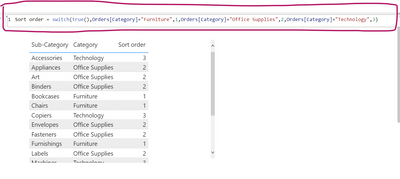
Switch() works for me without double quotes for 1,2,3,....
You can add a conditional column in Power query as shown below. hope this helps
Thanks. The conditional column solved this for me
Hi!
Right now your 4 is written as a number while the other numbers are strings due to the "" around them (e.g. "3"). If you change it so it says 1, 2, 3 and 4 instead of "1", "2", "3" and 4 you should be able to see all as numbers and be able to sort by that column.
I actually omitted the string in the "4" here as a mistake as they all appear as strings. Even when I removed the strings in all the numbers, only 4 still appears.
The Power BI Data Visualization World Championships is back! Get ahead of the game and start preparing now!
| User | Count |
|---|---|
| 44 | |
| 43 | |
| 33 | |
| 30 | |
| 27 |
| User | Count |
|---|---|
| 134 | |
| 114 | |
| 58 | |
| 57 | |
| 57 |