cancel
Showing results for 
Search instead for 
Did you mean: 

Try your skills in the Power BI Dataviz World Championship! Round one ends June 26. Join now

Reply
NAMI1356
Advocate I
Advocate I

Slow Refresh Power BI Desktop - Excel File

Hi Everyone,


Problem: we have PBIX file (5MB only) linked to different Excel files in Same Location - but when Refresh the Memory usage is upto 6 GB! Slow and Takes long time to Edit a Query.


What could be the reason?


What are best Solution to Make it Faster?


Regards,


1 ACCEPTED SOLUTION
v-huizhn-msft
Microsoft Employee
Microsoft Employee

Hi @NAMI1356,

I don't know your data structure in details, so it's hard to find the exact cause. If you go to the Task Manager, how many Microsoft.Mashup.Container*.exe can you find there, and are any of them busy?

I share some tips, please follow them and check if it works fine.

1. Disable "Backgroud data" and "parallel loading of tables" in current files under options. 
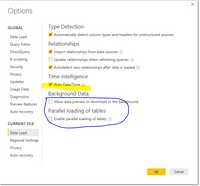
1.PNG

2. If you files have many columns of date/time type, you can disabled Data Load -> Auto Date/Time, so behind the scenes it doesn't create a date table automatically, which takes time. Disabling the auto date/time feature means you'll probably need to manually create a date table in the model. 

3. Please disable load query like the following screenshot.  Disabling Load doesn’t mean the query won’t be refreshed, it only means the query won’t be loaded into the memory. When you click on Refresh model in Power BI, their data will be used as intermediate source for other queries instead of loading directly into the model. 

2.PNG

4. You can filter your resource table and just retain the neccesary data before you load all the data into model.

In addtion, you can follow those two articles to optimize data model to improve the performance:
Data Import Best Practices in Power BI
Power BI Performance Tips and Techniques

Best Regards,
Angelia

View solution in original post

3 REPLIES 3
v-huizhn-msft
Microsoft Employee
Microsoft Employee

Hi @NAMI1356,

I don't know your data structure in details, so it's hard to find the exact cause. If you go to the Task Manager, how many Microsoft.Mashup.Container*.exe can you find there, and are any of them busy?

I share some tips, please follow them and check if it works fine.

1. Disable "Backgroud data" and "parallel loading of tables" in current files under options. 

1.PNG

2. If you files have many columns of date/time type, you can disabled Data Load -> Auto Date/Time, so behind the scenes it doesn't create a date table automatically, which takes time. Disabling the auto date/time feature means you'll probably need to manually create a date table in the model. 

3. Please disable load query like the following screenshot.  Disabling Load doesn’t mean the query won’t be refreshed, it only means the query won’t be loaded into the memory. When you click on Refresh model in Power BI, their data will be used as intermediate source for other queries instead of loading directly into the model. 

2.PNG

4. You can filter your resource table and just retain the neccesary data before you load all the data into model.

In addtion, you can follow those two articles to optimize data model to improve the performance:
Data Import Best Practices in Power BI
Power BI Performance Tips and Techniques

Best Regards,
Angelia

@v-huizhn-msft

Thanks for you help Angelia,


For : Microsoft.Mashup.Container*.exe


CPU Usage:40%

Memory Usage>260MB


for Change the settings we do as your assistance.


Thank you.

Nami

Hi @NAMI1356,

After changing all the settings, the CPU Usage:40% and Memory Usage>260MB, your resource is large? If you have resolved your issue? Please mark the right reply as answer, so more people will benefit from here.

Best Regards,
Angelia

Helpful resources

Announcements
Fabric Data Days is here Carousel

Fabric Data Days 2026

Don't miss out on Data Days, June 15 through August 7. Learn Fabric, Power BI, SQL, AI and more.

May Power BI Update Carousel

Power BI Monthly Update - May 2026

Check out the May 2026 Power BI update to learn about new features.

Power BI DataViz World Championships carousel

Power BI DataViz World Championships - June 2026

A new Power BI DataViz World Championship is coming this June! Don't miss out on submitting your entry.