cancel
Showing results for 
Search instead for 
Did you mean: 

Learn from the best! Meet the four finalists headed to the FINALS of the Power BI Dataviz World Championships! Register now

Reply
MiguelSaldana77
Resolver I
Resolver I

Timeline slicer Problems

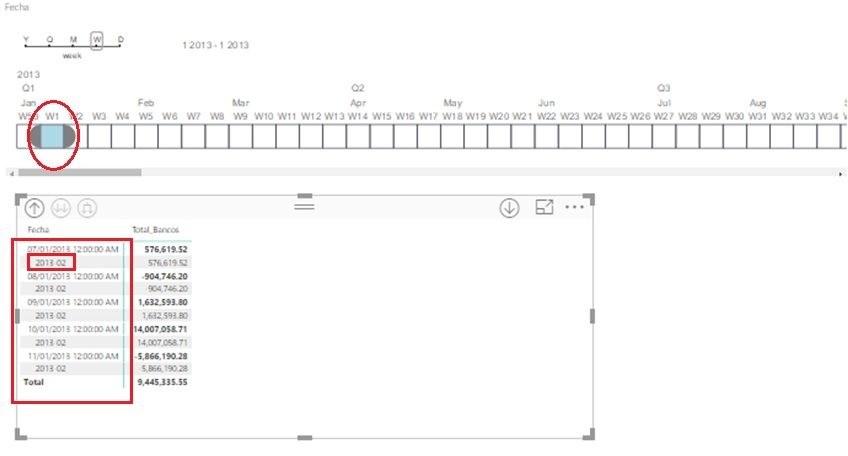
I have Problems with the Visual "Timeline"  when I select a specific week, this display the next week.

semana.jpg

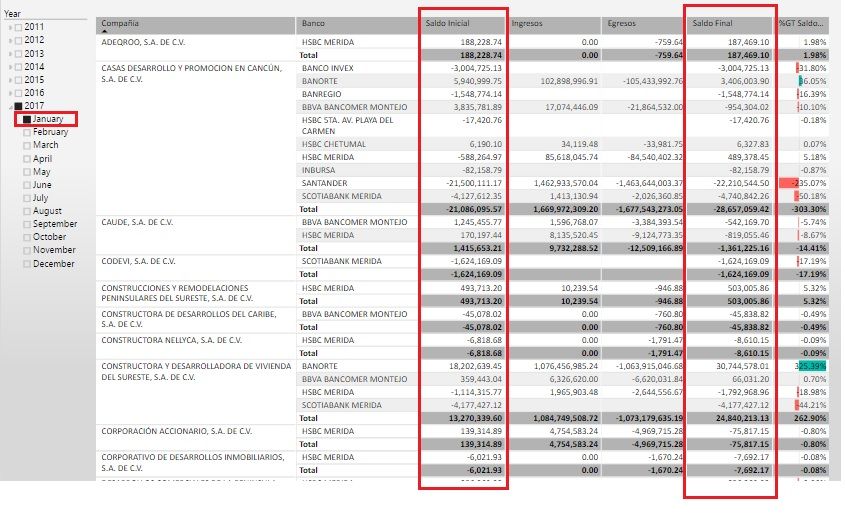
This is the first problem, but I need to show in a table something like the next image.  This table show begining ballance Monthly  and I need the same but Weekly.


 Monthly.jpg

The formula for Saldo Inicial is :


Saldo Inicial = CALCULATE (  SUM('Indicadores Bancos'[Total_Bancos]),
    FILTER(ALL('Indicadores Bancos'[Fecha].[Date]),DATEADD('Indicadores Bancos'[Fecha].[Date],1,MONTH) <= MAX ('Indicadores Bancos'[fecha].[Date])))  


This formula is working Ok , but I try to do the same with the week an It doesn't work. Other question,  what is beter work with the timeline visual or a HierarchySlicer about the week period.


Thanks


6 REPLIES 6
v-yulgu-msft
Microsoft Employee
Microsoft Employee

Hi @MiguelSaldana77,


How did you generate the week number in your scenario? Did it match the calendar week number?


There is a known issue with the old version of TimeLine slicer that it always display the first day of the next period. So, please remove the existing timeline slicer and import the latest version from Office store for a test.


Regards,
Yuliana Gu

Community Support Team _ Yuliana Gu
If this post helps, then please consider Accept it as the solution to help the other members find it more quickly.
Anonymous
Not applicable

Its likely to do with how each component is calculating what a Week is.  So to make sure you are comparing Apples to Apples, check how you are getting the weeknumber in the matrix/table.  Also check your timeline slicers options and see what you have set under "First Day of Week".  Something as simple as having Sunday being the first day here, but Monday in the other one could change the outcome of what is classed as "Week 1".

This is the formula


Semana-Año = CONCATENATE( CONCATENATE(YEAR('Indicadores Bancos'[Fecha].[Date]),"-"),
               IF(WEEKNUM('Indicadores Bancos'[Fecha].[Date])<10
                    ,CONCATENATE("0",WEEKNUM('Indicadores Bancos'[Fecha].[Date]))
                    ,WEEKNUM('Indicadores Bancos'[Fecha].[Date])))


I had to concatenate a cero when a week is lower than 10,  in order to sort the weeks

Anonymous
Not applicable

Ok i've cleaned up your formula, this should do the exact same thing as your longer one:

Semana-Año = YEAR('Indicadores Bancos'[Fecha].[Date]) & "-" & FORMAT(WEEKNUM('Indicadores Bancos'[Fecha].[Date], 1), "00")

I've explicitly stated to start your WEEKNUM calculation where the Week begins on Sunday.  if you change the ", 1" to a ", 2" in the WEEKNUM formula, you can change this to Monday if you like.


Now just check your setting for your Timeline Slicer, click on it and check in the Format section (looks like a paint roller).  There is a section called "First Day of the Week"


Thanks for the formula, but I don´t understand finally the diference? Well, maybe is easier resolvel the result now?


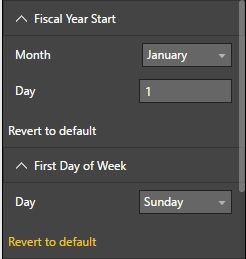
And I understood from the first time your sugeestion about the option, this is the default format and I don't see other opción to change. Any idea?


week.jpg


Anonymous
Not applicable

The main changes i made to your formula was simply removing redundant functions you didn't need.  Think of it as a cleaned up version.


I've attempted to replicate your scenario with the timeline slicer and i'm getting the same problem.  It looks like the Timeline Slicer is calculating the week number differently to how Power BI does it.  Its likely a fault within the custom visual itself.


Helpful resources

Announcements
New to Fabric survey Carousel

New to Fabric Survey

If you have recently started exploring Fabric, we'd love to hear how it's going. Your feedback can help with product improvements.

Power BI DataViz World Championships carousel

Power BI DataViz World Championships - June 2026

A new Power BI DataViz World Championship is coming this June! Don't miss out on submitting your entry.

Join our Fabric User Panel

Join our Fabric User Panel

Share feedback directly with Fabric product managers, participate in targeted research studies and influence the Fabric roadmap.

March Power BI Update Carousel

Power BI Community Update - March 2026

Check out the March 2026 Power BI update to learn about new features.