This time we’re going bigger than ever. Fabric, Power BI, SQL, AI and more. We're covering it all. You won't want to miss it.
Learn moreGet Fabric Certified for FREE during AI Skills Fest. This week only. Secure your voucher now.
All,
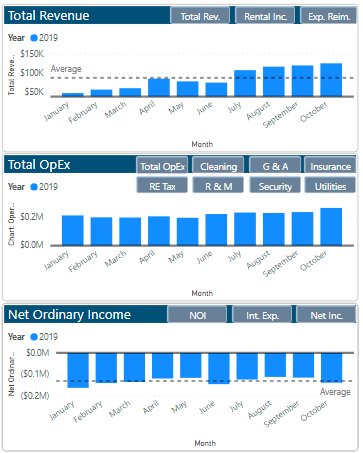
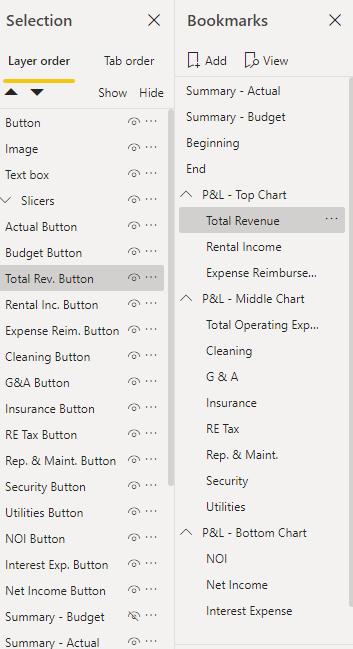
I have created a chart that, through buttons and bookmarks, changes to the variable chart I would like. While the buttons fuction properly and get the job done, I would like to convert the buttons into slicers so I can select the graph of my choosing. I have tried multiple suggested solutions from the community, including creating new columns/queries and downloading the hierarchy slicer, but have yet to resolve my question.
I would greatly appreciate someone helping.
Picture of Charts with Buttons
Picture of selections and bookmarks tied in with the buttons
Thanks,
Adam
Solved! Go to Solution.
I Think your are looking for something like this.
https://www.fourmoo.com/2017/11/21/power-bi-using-a-slicer-to-show-different-measures/
I Think your are looking for something like this.
https://www.fourmoo.com/2017/11/21/power-bi-using-a-slicer-to-show-different-measures/
Hi,
have you try creating a table with a row for each button and then a measure switching showing different measures by new table selection?
Lorenzo
Check out the May 2026 Power BI update to learn about new features.
Sign up to receive a private message when registration opens and key events begin.
If you have recently started exploring Fabric, we'd love to hear how it's going. Your feedback can help with product improvements.
| User | Count |
|---|---|
| 23 | |
| 21 | |
| 21 | |
| 21 | |
| 16 |
| User | Count |
|---|---|
| 55 | |
| 53 | |
| 45 | |
| 26 | |
| 24 |