Join us at FabCon Atlanta from March 16 - 20, 2026, for the ultimate Fabric, Power BI, AI and SQL community-led event. Save $200 with code FABCOMM.
Register now!The Power BI Data Visualization World Championships is back! Get ahead of the game and start preparing now! Learn more
Hello everyone!
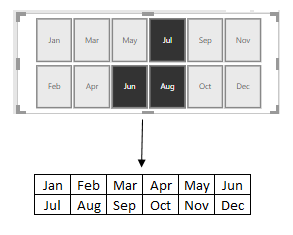
Is there a way to sort slicer like this? Thank you in advance.
Solved! Go to Solution.
Hi @DaoHoang,
You can use the visual Chiclet Slicer. Download it from the market place.
Put Month into Category then set General :
Column 6
Rows 0
Chiara
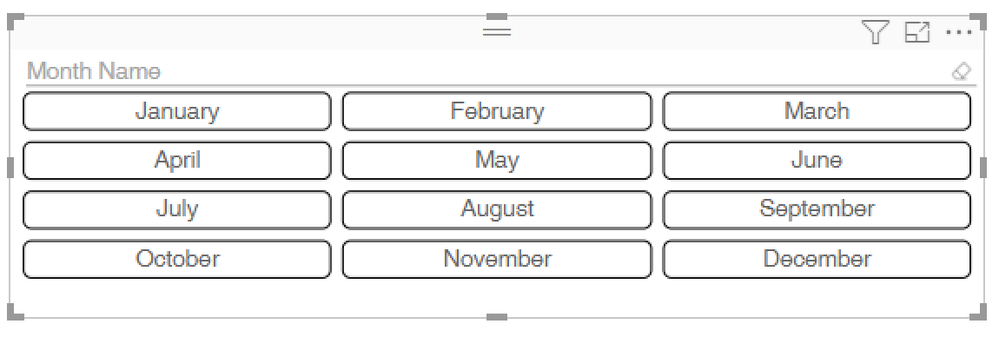
You cant do that with the existing "default" slicer.
As @Anonymous mentioned, Chiclet Slicer is your best bet and it looks like this:
You cant do that with the existing "default" slicer.
As @Anonymous mentioned, Chiclet Slicer is your best bet and it looks like this:
Hi @DaoHoang,
You can use the visual Chiclet Slicer. Download it from the market place.
Put Month into Category then set General :
Column 6
Rows 0
Chiara
It works. Thanks you very much
The Power BI Data Visualization World Championships is back! Get ahead of the game and start preparing now!
| User | Count |
|---|---|
| 41 | |
| 38 | |
| 36 | |
| 31 | |
| 28 |
| User | Count |
|---|---|
| 128 | |
| 88 | |
| 79 | |
| 68 | |
| 63 |