Join us at FabCon Atlanta from March 16 - 20, 2026, for the ultimate Fabric, Power BI, AI and SQL community-led event. Save $200 with code FABCOMM.
Register now!The Power BI Data Visualization World Championships is back! It's time to submit your entry. Live now!
Hello everyone!
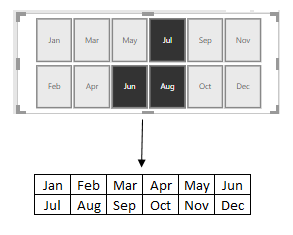
Is there a way to sort slicer like this? Thank you in advance.
Solved! Go to Solution.
Hi @DaoHoang,
You can use the visual Chiclet Slicer. Download it from the market place.
Put Month into Category then set General :
Column 6
Rows 0
Chiara
You cant do that with the existing "default" slicer.
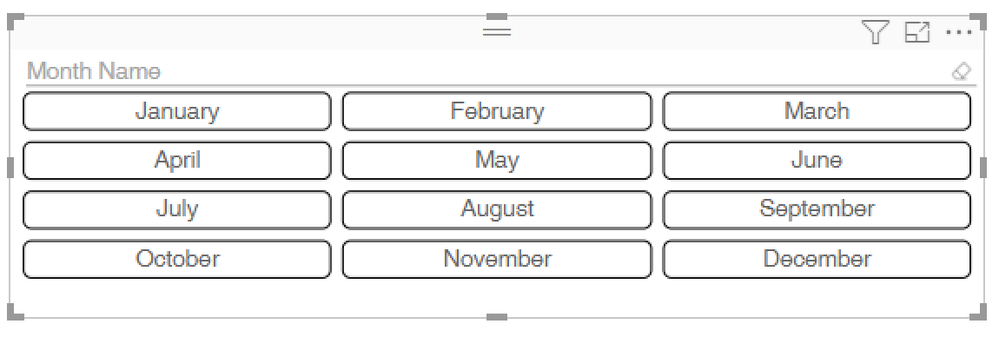
As @Anonymous mentioned, Chiclet Slicer is your best bet and it looks like this:
You cant do that with the existing "default" slicer.
As @Anonymous mentioned, Chiclet Slicer is your best bet and it looks like this:
Hi @DaoHoang,
You can use the visual Chiclet Slicer. Download it from the market place.
Put Month into Category then set General :
Column 6
Rows 0
Chiara
It works. Thanks you very much
The Power BI Data Visualization World Championships is back! It's time to submit your entry.
Check out the January 2026 Power BI update to learn about new features.
| User | Count |
|---|---|
| 56 | |
| 42 | |
| 40 | |
| 21 | |
| 21 |
| User | Count |
|---|---|
| 150 | |
| 105 | |
| 63 | |
| 36 | |
| 36 |