cancel
Showing results for 
Search instead for 
Did you mean: 

The Power BI Data Visualization World Championships is back! Get ahead of the game and start preparing now! Learn more

Reply
Anonymous
Not applicable

Slicer Help

I have this table:

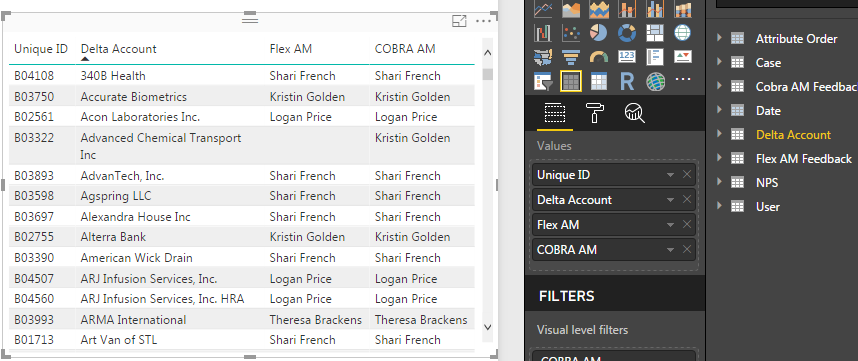
1.PNG


As you can see an account will have 2 managers. They typically will be the same person if there are 2 assigned to a company, however there are instances where they are mix and matched or there's just one manager. What I'm trying to figure out is a way to build a slicer that when selecting a person's name, any account with their name on it is returned, whether they are the Flex manager, Cobra manager, or both. Is this possible? I do not want 2 slicers for each person because it splits the data out when I'm just looking for overall stats by a person's name.

2 REPLIES 2
v-yulgu-msft
Microsoft Employee
Microsoft Employee

Hi @Anonymous,


Create an extra table to list all available slicer selections. Here I renamed the column with [Items]. Later, you need to add [Items] into slicer.

slicer selection =
UNION (
    VALUES ( 'sample data'[COBRA AM] ),
    EXCEPT ( VALUES ( 'sample data'[Flex AM] ), VALUES ( 'sample data'[COBRA AM] ) )
)

Then, create a measure.

flag =
IF (
    (
        IF (
            SELECTEDVALUE ( 'sample data'[Flex AM] )
                = SELECTEDVALUE ( 'slicer selection'[Items] ),
            1,
            0
        )
            || IF (
                SELECTEDVALUE ( 'sample data'[COBRA AM] )
                    = SELECTEDVALUE ( 'slicer selection'[Items] ),
                1,
                0
            )
    )
        = TRUE (),
    1,
    0
)

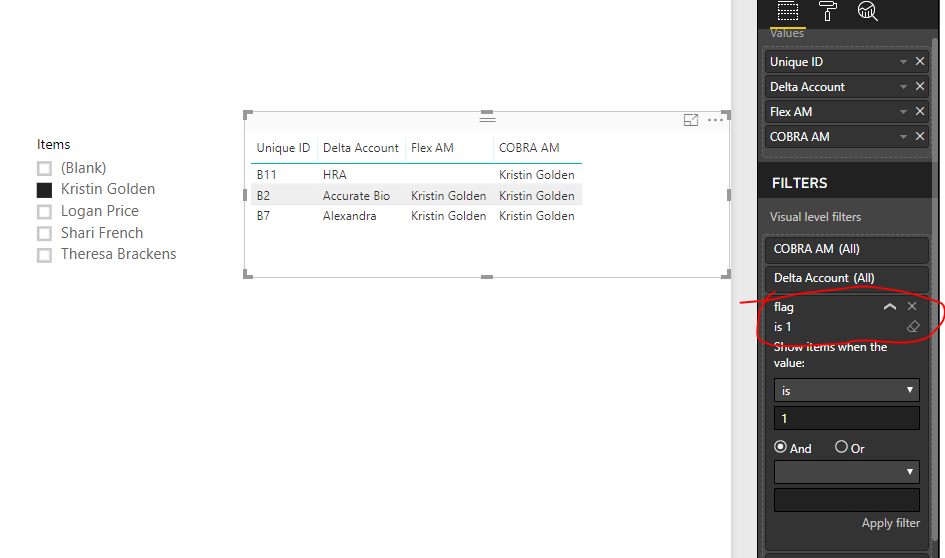
Add [flag] to visual level filters.

1.PNG


Best regards,

Yuliana Gu

Community Support Team _ Yuliana Gu
If this post helps, then please consider Accept it as the solution to help the other members find it more quickly.
Anonymous
Not applicable

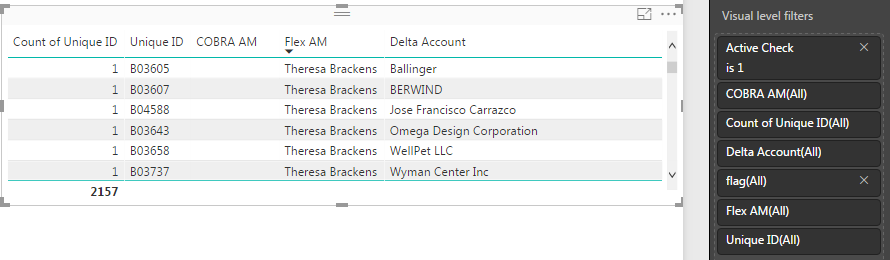
Hi! Thank you @v-yulgu-msft. This works perfectly except for one thing. So I keep a table of the active clients and I keep a count on the side:


1.PNG


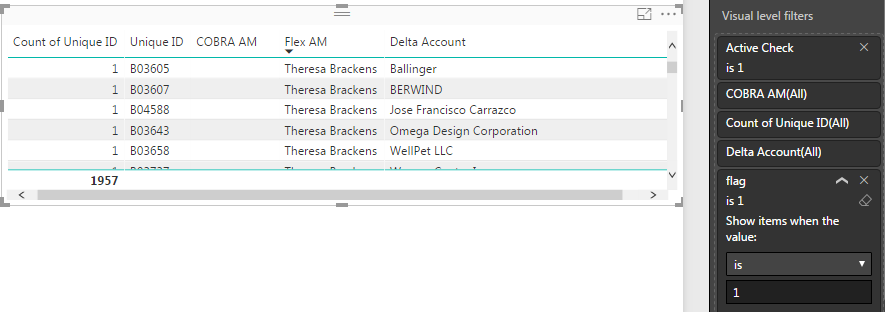
As you can see its 2157. When I apply the flag, the number goes down to 1957:


1.PNG

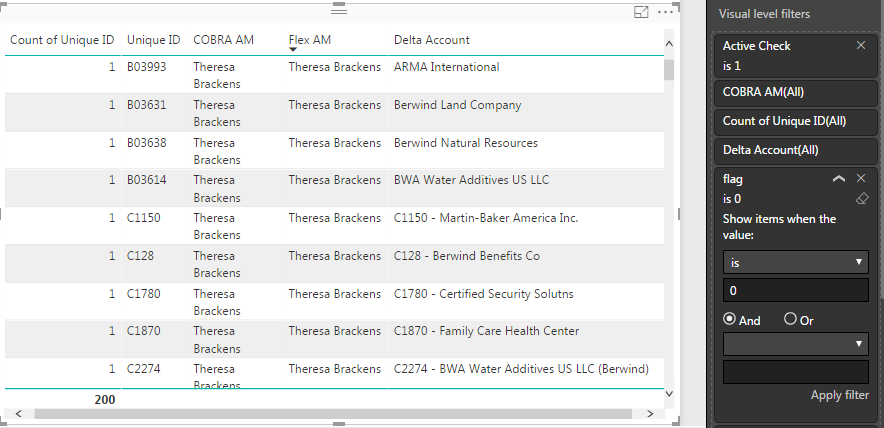
When I flip it to 0 to see why this is happening, it gives me the 200 accounts that are missing. The only pattern I can see is that they are all accounts with 2 people that are the same person:

1.PNG

Do you know how I can fix it from here?

Helpful resources

Announcements
Power BI DataViz World Championships

Power BI Dataviz World Championships

The Power BI Data Visualization World Championships is back! Get ahead of the game and start preparing now!

December 2025 Power BI Update Carousel

Power BI Monthly Update - December 2025

Check out the December 2025 Power BI Holiday Recap!

FabCon Atlanta 2026 carousel

FabCon Atlanta 2026

Join us at FabCon Atlanta, March 16-20, for the ultimate Fabric, Power BI, AI and SQL community-led event. Save $200 with code FABCOMM.