Don't miss your chance to take the Fabric Data Engineer (DP-600) exam for FREE! Find out how by attending the DP-600 session on April 23rd (pacific time), live or on-demand.
Learn moreJoin the FabCon + SQLCon recap series. Up next: Power BI, Real-Time Intelligence, IQ and AI, and Data Factory take center stage. All sessions are available on-demand after the live show. Register now
Hi,
So I'm trying to get a sum of sales for multiple customers all put into one single line.
I have two tables in my dataset: One with multiple entries of each customer representing a single transaction each. I then also have a table with duplicates of customers removed.
so:
Customer: Sales
A £100
B £90
A £45
C £100
D £30
A £250
B £40
Second Table:
A Total
B Total
C Total
D Total
When I try a simple SUM(Table[Sales]) formula to create a measured column showing the total in the second table - I have the total of sales regardless of customer populate into each line, and not the total for each customer respectively.
Sorry if this is a silly question - but I've used power bi so much the last few weeks I think a part of my brain has melted.
Thanks in advance for any help.
Solved! Go to Solution.
I think I've managed to work this one out now, and I'll detail what I've done for the sake of anyone else that has this problem in future:
I created the measure as before:
I think I've managed to work this one out now, and I'll detail what I've done for the sake of anyone else that has this problem in future:
I created the measure as before:
I think I might have used some incorrect terminology when explaining my problem. I'm trying to complete my work on a table in the data, not a table visualisation on a report. Thank you for the help though.
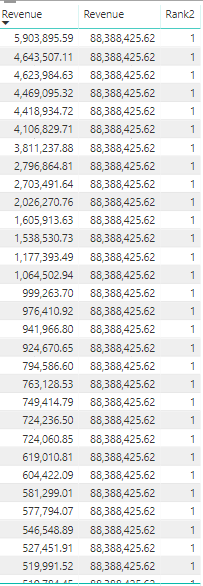
When I create a measure to sum the revenue, and then subsequently use RANKX; I recieve a total of revenue accross all lines, and not split by individual customer:
Revenue Measure=SUM('AllMonths'[Revenue])
Rank Measure=RANKX(ALL('AllMonths'[CustomerID]),[Revenue Measure])
This also results in every line being ranked as #1
Each different colour in the image below represents a different customer. I'm trying to have it so that there is only one line for each customer, with a sum of it's revenue accross the multiple lines. I'm then going to try and rank the customers by their revenue.
Insert new font, get table you want sum, click on group by, will open another window modify to add the column you want sum.
= Table.Group(#"Changed Type", {"Client"}, {{"Sum", each List.Sum([Value_Sum]), type number}})
It sounds like you might be creating a new column instead of a new measure. You shouldn't have to do either of that though. Your first table probably has something like Transaction ID, Customer Name, Sales. So your second table should just be the Customer Name and Sales column summarized as sum.
Check out the April 2026 Power BI update to learn about new features.
If you have recently started exploring Fabric, we'd love to hear how it's going. Your feedback can help with product improvements.
A new Power BI DataViz World Championship is coming this June! Don't miss out on submitting your entry.
| User | Count |
|---|---|
| 48 | |
| 46 | |
| 41 | |
| 20 | |
| 17 |
| User | Count |
|---|---|
| 70 | |
| 69 | |
| 32 | |
| 27 | |
| 26 |