Don't miss your chance to take the Fabric Data Engineer (DP-700) exam on us!
Learn moreWe've captured the moments from FabCon & SQLCon that everyone is talking about, and we are bringing them to the community, live and on-demand. Starts on April 14th. Register now
My biggest pet peeve is this.
I have a performance dashboard that connects to an SQL via directquery. I also have an excel file that has a bunch of KPI numbers. how do i get my performance indicators from the SQL and place them against my KPI numbers on the excel file?
thanks!
Solved! Go to Solution.
Hi @amirulmanaf,
In Power BI desktop, SQL Server data source supports DirectQuery while Excel can only use Import mode. For more information, please see: Use DirectQuery in Power BI Desktop.
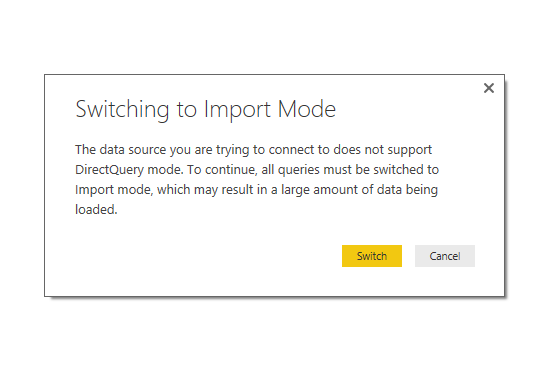
In your scenario, you need to change DirectQuery to Import mode so that both SQL Server database and Excel data can exist in the same report. You can just click the Switch button to change mode.
Best Regards,
Qiuyun Yu
My dear friend ,
1. In PowerBI If u go with Direct connection u can't connect anyother data apart from that Database.
2. If u have created the report in Import mode u can't switch that into Direct Connection .
3. If u r in Direction Connection u can switch to Import Mode.
Let me know if any Question on this my dear friend
Just curious as to why this just has to be the case. Just imagine having multiple data sources that need cross-filtering, and having to switch to import mode for one of the sources would result in system flood as it involves millions of rows. Wouldnt you want to manipulate the query system somehow to allow directquery for all sources? Perhaps someone could assist to enlighten.
Many thanks!
Hi @amirulmanaf,
Currently, DirectQuery isn't available to all data sources, just a part of ( Supported Data Sources ). And there are some limitation to use DirectQuery, see: Limitations of DirectQuery. If you want to use DirectQuery in one report, all tables must come from the same data source.
Best Regards,
Qiuyun Yu
Hi @amirulmanaf,
In Power BI desktop, SQL Server data source supports DirectQuery while Excel can only use Import mode. For more information, please see: Use DirectQuery in Power BI Desktop.
In your scenario, you need to change DirectQuery to Import mode so that both SQL Server database and Excel data can exist in the same report. You can just click the Switch button to change mode.
Best Regards,
Qiuyun Yu
If you have recently started exploring Fabric, we'd love to hear how it's going. Your feedback can help with product improvements.
A new Power BI DataViz World Championship is coming this June! Don't miss out on submitting your entry.
Share feedback directly with Fabric product managers, participate in targeted research studies and influence the Fabric roadmap.
| User | Count |
|---|---|
| 56 | |
| 40 | |
| 35 | |
| 19 | |
| 18 |
| User | Count |
|---|---|
| 70 | |
| 69 | |
| 38 | |
| 35 | |
| 23 |