cancel
Showing results for 
Search instead for 
Did you mean: 

The Power BI Data Visualization World Championships is back! Get ahead of the game and start preparing now! Learn more

Reply
amirulmanaf
New Member

Simultaneous Data Sources?

My biggest pet peeve is this.

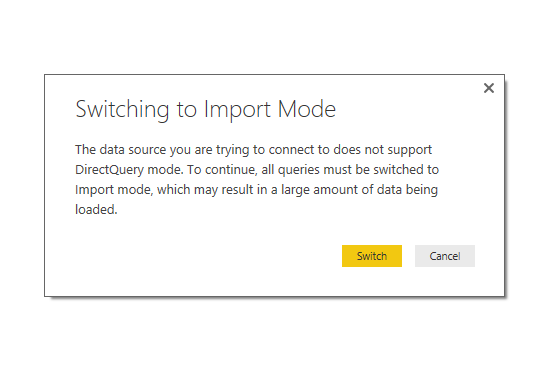
DirectQueryLOAD.PNG

 I have a performance dashboard that connects to an SQL via directquery.  I also have an excel file that has a bunch of KPI numbers.  how do i get my performance indicators from the SQL and place them against my KPI numbers on the excel file?


thanks!


1 ACCEPTED SOLUTION
v-qiuyu-msft
Community Support
Community Support

Hi @amirulmanaf,


In Power BI desktop, SQL Server data source supports DirectQuery while Excel can only use Import mode. For more information, please see: Use DirectQuery in Power BI Desktop.


In your scenario, you need to change DirectQuery to Import mode so that both SQL Server database and Excel data can exist in the same report. You can just click the Switch button to change mode.


Best Regards,
Qiuyun Yu

Community Support Team _ Qiuyun Yu
If this post helps, then please consider Accept it as the solution to help the other members find it more quickly.

View solution in original post

4 REPLIES 4
Baskar
Resident Rockstar
Resident Rockstar

My dear friend ,


1. In PowerBI If u go with Direct connection u can't connect anyother data apart from that Database.

2. If u have created the report in Import mode u can't switch that into Direct Connection .

3. If u r in Direction Connection  u can switch to Import Mode.


Let me know if any Question on this my dear friend

Just curious as to why this just has to be the case.  Just imagine having multiple data sources that need cross-filtering, and having to switch to import mode for one of the sources would result in system flood as it involves millions of rows.  Wouldnt you want to manipulate the query system somehow to allow directquery for all sources?  Perhaps someone could assist to enlighten.


Many thanks!

Hi @amirulmanaf,


Currently, DirectQuery isn't available to all data sources, just a part of ( Supported Data Sources ). And there are some limitation to use DirectQuery, see: Limitations of DirectQuery. If you want to use DirectQuery in one report, all tables must come from the same data source.


Best Regards,
Qiuyun Yu

Community Support Team _ Qiuyun Yu
If this post helps, then please consider Accept it as the solution to help the other members find it more quickly.
v-qiuyu-msft
Community Support
Community Support

Hi @amirulmanaf,


In Power BI desktop, SQL Server data source supports DirectQuery while Excel can only use Import mode. For more information, please see: Use DirectQuery in Power BI Desktop.


In your scenario, you need to change DirectQuery to Import mode so that both SQL Server database and Excel data can exist in the same report. You can just click the Switch button to change mode.


Best Regards,
Qiuyun Yu

Community Support Team _ Qiuyun Yu
If this post helps, then please consider Accept it as the solution to help the other members find it more quickly.

Helpful resources

Announcements
Power BI DataViz World Championships

Power BI Dataviz World Championships

The Power BI Data Visualization World Championships is back! Get ahead of the game and start preparing now!

December 2025 Power BI Update Carousel

Power BI Monthly Update - December 2025

Check out the December 2025 Power BI Holiday Recap!

FabCon Atlanta 2026 carousel

FabCon Atlanta 2026

Join us at FabCon Atlanta, March 16-20, for the ultimate Fabric, Power BI, AI and SQL community-led event. Save $200 with code FABCOMM.