Get certified for free when you join Fabric Data Days 2026 and dive into Fabric, Power BI, SQL, AI, and other essential data skills.
Join nowJuly 7 - July 17 | Round 2 of the Power BI Dataviz World Championships. Don't miss your chance! Learn more
Hi All, My PBI reports are working just fine but the problem is, it's having performance issue in my actual pbi, loading takes too much of time. But in my mockup pbi it's working fine. i think this is due to long queries of the dax measures.
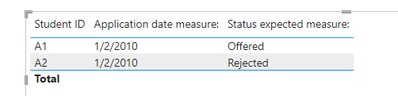
Two measure that's needing simplifications
1.
I need to apply the same logic from the mockup pbi to my actual pbi and it's having performance issues, and i believe this is due to the long dax queries.Hoping that someone can guide me on this, thank you!
Hi, @Anonymous
If possible, have you considered storing the results of a subset of variables as calculated columns/tables?
Best Regards,
Community Support Team _ Eason
Join us in Barcelona for FabCon and SQLCon, the Fabric, Power BI, SQL, and AI community event. Save €200 with code FABCMTY200.
Check out the July 2026 Power BI update to learn about new features.
Join Data Days 2026: 60 days of free live/on-demand sessions, challenges, study groups, and certification opportunities.
| User | Count |
|---|---|
| 30 | |
| 25 | |
| 25 | |
| 23 | |
| 16 |
| User | Count |
|---|---|
| 54 | |
| 34 | |
| 27 | |
| 23 | |
| 20 |