Hi All, My PBI reports are working just fine but the problem is, it's having performance issue in my actual pbi, loading takes too much of time. But in my mockup pbi it's working fine. i think this is due to long queries of the dax measures.
Two measure that's needing simplifications
1.
Status expected measure: =
VAR _latestdate =
CALCULATE (
MAX ( Student[Application Date] ),
ALLEXCEPT ( Student, Student[Student ID] )
)
VAR _maxstatuskey =
MAXX (
FILTER (
ALL ( Student ),
Student[Student ID] = MAX ( Student[Student ID] )
&& Student[Application Date] = _latestdate
),
Student[Application Status Key]
)
RETURN
IF (
HASONEVALUE ( Student[Student ID] ),
CALCULATETABLE (
VALUES ( 'Status'[Status] ),
'Status'[Application Status Key] = _maxstatuskey
)
)
2.
Application date measure: =
VAR _latestdate =
CALCULATE (
MAX ( Student[Application Date] ),
ALLEXCEPT ( Student, Student[Student ID] )
)
RETURN
IF( HASONEVALUE(Student[Student ID]),
_latestdate)
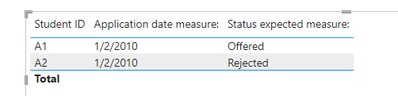
Mockup result which is correct:
pbi file
I need to apply the same logic from the mockup pbi to my actual pbi and it's having performance issues, and i believe this is due to the long dax queries.Hoping that someone can guide me on this, thank you!


