Join us at FabCon Atlanta from March 16 - 20, 2026, for the ultimate Fabric, Power BI, AI and SQL community-led event. Save $200 with code FABCOMM.
Register now!The Power BI Data Visualization World Championships is back! Get ahead of the game and start preparing now! Learn more
Hi,
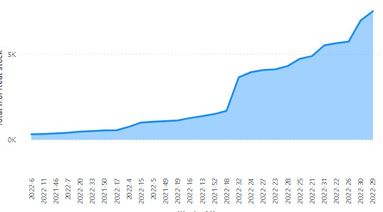
pls I have problem with X-axis order even if I used "Sort axis > week of year > sort ascending", it didn't solve my problem. How could I resolve it? Help me pls
Solved! Go to Solution.
If you're not using a calendar table. You should do that.
Next you go and create a integer version of the yearweek and use Power bi Sort by function.
here is an example but with months in stead. I hope you get the general idea.
Hi, they are sorted alphabetically - you can try formatting your weeknumber as "0#" so that when you have week 6, you get 06, instead of 6 - this would translate to 2022-06 and it will be sorted properly. That's the easiest thing you can do, having a calendar table is always a good approach, as already suggested above.
If you're not using a calendar table. You should do that.
Next you go and create a integer version of the yearweek and use Power bi Sort by function.
here is an example but with months in stead. I hope you get the general idea.
Hi,
I am not sure without seeing your dataset, but I assume you can try to sort week of year column by weekenddate column in the same table.
If you do not have a weekenddate column in the same table, try to create this in Power Query Editor or by DAX formula (Calculated Column), and then sort week of year column by weekenddate column.
Thank you.
The Power BI Data Visualization World Championships is back! Get ahead of the game and start preparing now!
| User | Count |
|---|---|
| 39 | |
| 37 | |
| 33 | |
| 33 | |
| 29 |
| User | Count |
|---|---|
| 134 | |
| 96 | |
| 78 | |
| 67 | |
| 65 |