cancel
Showing results for 
Search instead for 
Did you mean: 

Learn from the best! Meet the four finalists headed to the FINALS of the Power BI Dataviz World Championships! Register now

Reply
Anonymous
Not applicable

Simplifying DAX Code

Hi All, My PBI reports are working just fine but the problem is, it's having performance issue in my actual pbi, loading takes too much of time. But in my mockup pbi it's working fine. i think this is due to long queries of the dax measures. 


Two measure that's needing simplifications

1. 

Status expected measure: =
VAR _latestdate =
    CALCULATE (
        MAX ( Student[Application Date] ),
        ALLEXCEPT ( Student, Student[Student ID] )
    )
VAR _maxstatuskey =
    MAXX (
        FILTER (
            ALL ( Student ),
            Student[Student ID] = MAX ( Student[Student ID] )
                && Student[Application Date] = _latestdate
        ),
        Student[Application Status Key]
    )
RETURN
    IF (
        HASONEVALUE ( Student[Student ID] ),
        CALCULATETABLE (
            VALUES ( 'Status'[Status] ),
            'Status'[Application Status Key] = _maxstatuskey
        )
    )
 
 
2. 
Application date measure: =
VAR _latestdate =
    CALCULATE (
        MAX ( Student[Application Date] ),
        ALLEXCEPT ( Student, Student[Student ID] )
    )
RETURN
IF( HASONEVALUE(Student[Student ID]),
    _latestdate)
 
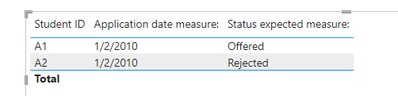
Mockup result which is correct:

ameng_0-1660066280539.png

pbi file 

I need to apply the same logic from the mockup pbi to my actual pbi and it's having performance issues, and i believe this is due to the long dax queries.Hoping that someone can guide me on this, thank you!

1 REPLY 1
v-easonf-msft
Community Support
Community Support

Hi, @Anonymous 

If possible, have you considered storing the results of a subset of variables as calculated columns/tables?


Best Regards,
Community Support Team _ Eason

Helpful resources

Announcements
New to Fabric survey Carousel

New to Fabric Survey

If you have recently started exploring Fabric, we'd love to hear how it's going. Your feedback can help with product improvements.

Power BI DataViz World Championships carousel

Power BI DataViz World Championships - June 2026

A new Power BI DataViz World Championship is coming this June! Don't miss out on submitting your entry.

Join our Fabric User Panel

Join our Fabric User Panel

Share feedback directly with Fabric product managers, participate in targeted research studies and influence the Fabric roadmap.

March Power BI Update Carousel

Power BI Community Update - March 2026

Check out the March 2026 Power BI update to learn about new features.