This time we’re going bigger than ever. Fabric, Power BI, SQL, AI and more. We're covering it all. You won't want to miss it.
Learn moreDid you hear? There's a new SQL AI Developer certification (DP-800). Start preparing now and be one of the first to get certified. Register now
Hello I'm new to dax and I have some problems with it syntax. I want to create a new mesure named ""cumulated" based on an other mesure "AverageBudgetYear".
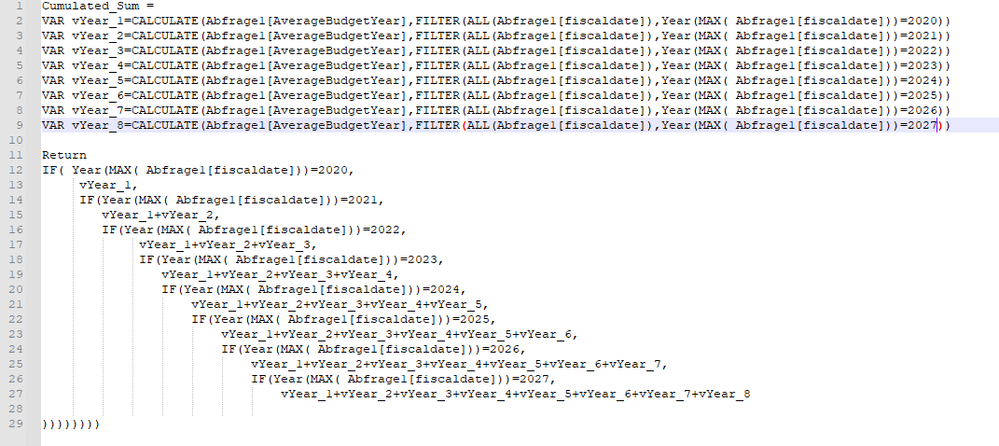
Actually I have 2 problems, first I need to remove duplicate lines in code and symplify the syntax and second I need to resolve this error message "A function 'MAX' has been used in a True/False expression that is used as a table filter expression. This is not allowed".
This is my syntaxe:
Solved! Go to Solution.
Hey @Anonymous ,
the error with the MAX expression is a little annoying. You can save the value of MAX in a variable, that should fix it.
For the many ifs I would use SWITCH with TRUE in combination instead:
https://powerpivotpro.com/2015/03/the-diabolical-genius-of-switch-true/
So the formula could look like this:
Cumulated Sum =
VAR vMaxDate = YEAR(MAX(Abfrage1[fiscaldate]))
VAR vYear_1 = CALCULATE( [AverageBudgetYear], FILTER( ALL(Abfrage1[fiscaldate]), vMaxDate = 2020))
VAR vYear_2 = CALCULATE( [AverageBudgetYear], FILTER( ALL(Abfrage1[fiscaldate]), vMaxDate = 2021))
-- and so on
RETURN
SWITCH( TRUE(),
vMaxDate = 2020, vYear_1,
vMaxDate = 2021, vYear_2
-- and so on
)
I don't fully understand your approach. For me it looks like you use the MAX value for the calculate. Then you could just add it dynamically from the variable:
Cumulated Sum =
VAR vMaxDate = YEAR(MAX(Abfrage1[fiscaldate]))
VAR vResult = CALCULATE( [AverageBudgetYear], FILTER( ALL(Abfrage1[fiscaldate]), vMaxDate = vMaxDate ))
RETURN
vResult
Hello @selimovd, thank you very much for responding your tricks really help me resolving the issues that I have.
Hey @Anonymous ,
I'm happy you could solve that 😊
Best regards
Denis
Hey @Anonymous ,
the error with the MAX expression is a little annoying. You can save the value of MAX in a variable, that should fix it.
For the many ifs I would use SWITCH with TRUE in combination instead:
https://powerpivotpro.com/2015/03/the-diabolical-genius-of-switch-true/
So the formula could look like this:
Cumulated Sum =
VAR vMaxDate = YEAR(MAX(Abfrage1[fiscaldate]))
VAR vYear_1 = CALCULATE( [AverageBudgetYear], FILTER( ALL(Abfrage1[fiscaldate]), vMaxDate = 2020))
VAR vYear_2 = CALCULATE( [AverageBudgetYear], FILTER( ALL(Abfrage1[fiscaldate]), vMaxDate = 2021))
-- and so on
RETURN
SWITCH( TRUE(),
vMaxDate = 2020, vYear_1,
vMaxDate = 2021, vYear_2
-- and so on
)
I don't fully understand your approach. For me it looks like you use the MAX value for the calculate. Then you could just add it dynamically from the variable:
Cumulated Sum =
VAR vMaxDate = YEAR(MAX(Abfrage1[fiscaldate]))
VAR vResult = CALCULATE( [AverageBudgetYear], FILTER( ALL(Abfrage1[fiscaldate]), vMaxDate = vMaxDate ))
RETURN
vResult
Hey @Anonymous ,
did it work with the measure I posted?
I'm curious if you could solve this issue 🙂
Check out the April 2026 Power BI update to learn about new features.
Sign up to receive a private message when registration opens and key events begin.
If you have recently started exploring Fabric, we'd love to hear how it's going. Your feedback can help with product improvements.
| User | Count |
|---|---|
| 36 | |
| 33 | |
| 31 | |
| 21 | |
| 16 |
| User | Count |
|---|---|
| 66 | |
| 55 | |
| 31 | |
| 24 | |
| 23 |