Don't miss your chance to take the Fabric Data Engineer (DP-600) exam for FREE! Find out how by attending the DP-600 session on April 23rd (pacific time), live or on-demand.
Learn moreJoin the FabCon + SQLCon recap series. Up next: Power BI, Real-Time Intelligence, IQ and AI, and Data Factory take center stage. All sessions are available on-demand after the live show. Register now
Hello I'm new to dax and I have some problems with it syntax. I want to create a new mesure named ""cumulated" based on an other mesure "AverageBudgetYear".
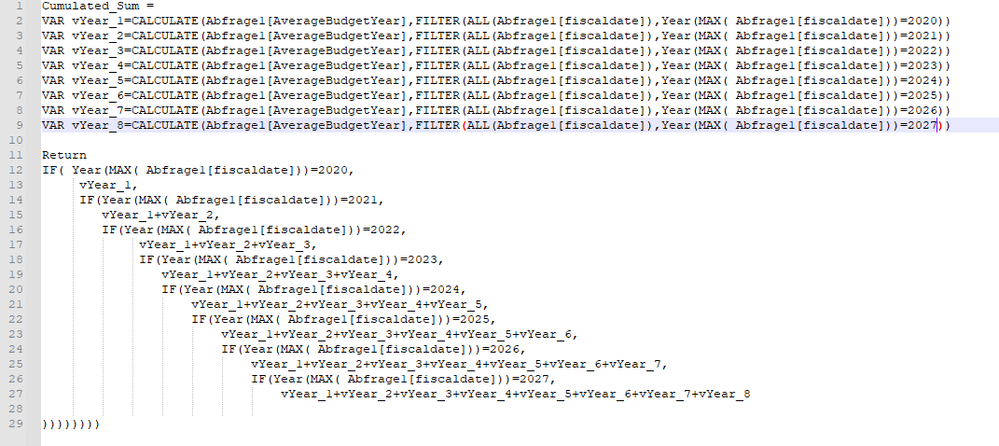
Actually I have 2 problems, first I need to remove duplicate lines in code and symplify the syntax and second I need to resolve this error message "A function 'MAX' has been used in a True/False expression that is used as a table filter expression. This is not allowed".
This is my syntaxe:
Solved! Go to Solution.
Hey @Anonymous ,
the error with the MAX expression is a little annoying. You can save the value of MAX in a variable, that should fix it.
For the many ifs I would use SWITCH with TRUE in combination instead:
https://powerpivotpro.com/2015/03/the-diabolical-genius-of-switch-true/
So the formula could look like this:
Cumulated Sum =
VAR vMaxDate = YEAR(MAX(Abfrage1[fiscaldate]))
VAR vYear_1 = CALCULATE( [AverageBudgetYear], FILTER( ALL(Abfrage1[fiscaldate]), vMaxDate = 2020))
VAR vYear_2 = CALCULATE( [AverageBudgetYear], FILTER( ALL(Abfrage1[fiscaldate]), vMaxDate = 2021))
-- and so on
RETURN
SWITCH( TRUE(),
vMaxDate = 2020, vYear_1,
vMaxDate = 2021, vYear_2
-- and so on
)
I don't fully understand your approach. For me it looks like you use the MAX value for the calculate. Then you could just add it dynamically from the variable:
Cumulated Sum =
VAR vMaxDate = YEAR(MAX(Abfrage1[fiscaldate]))
VAR vResult = CALCULATE( [AverageBudgetYear], FILTER( ALL(Abfrage1[fiscaldate]), vMaxDate = vMaxDate ))
RETURN
vResult
Hello @selimovd, thank you very much for responding your tricks really help me resolving the issues that I have.
Hey @Anonymous ,
I'm happy you could solve that 😊
Best regards
Denis
Hey @Anonymous ,
the error with the MAX expression is a little annoying. You can save the value of MAX in a variable, that should fix it.
For the many ifs I would use SWITCH with TRUE in combination instead:
https://powerpivotpro.com/2015/03/the-diabolical-genius-of-switch-true/
So the formula could look like this:
Cumulated Sum =
VAR vMaxDate = YEAR(MAX(Abfrage1[fiscaldate]))
VAR vYear_1 = CALCULATE( [AverageBudgetYear], FILTER( ALL(Abfrage1[fiscaldate]), vMaxDate = 2020))
VAR vYear_2 = CALCULATE( [AverageBudgetYear], FILTER( ALL(Abfrage1[fiscaldate]), vMaxDate = 2021))
-- and so on
RETURN
SWITCH( TRUE(),
vMaxDate = 2020, vYear_1,
vMaxDate = 2021, vYear_2
-- and so on
)
I don't fully understand your approach. For me it looks like you use the MAX value for the calculate. Then you could just add it dynamically from the variable:
Cumulated Sum =
VAR vMaxDate = YEAR(MAX(Abfrage1[fiscaldate]))
VAR vResult = CALCULATE( [AverageBudgetYear], FILTER( ALL(Abfrage1[fiscaldate]), vMaxDate = vMaxDate ))
RETURN
vResult
Hey @Anonymous ,
did it work with the measure I posted?
I'm curious if you could solve this issue 🙂
Check out the April 2026 Power BI update to learn about new features.
If you have recently started exploring Fabric, we'd love to hear how it's going. Your feedback can help with product improvements.
A new Power BI DataViz World Championship is coming this June! Don't miss out on submitting your entry.
| User | Count |
|---|---|
| 48 | |
| 40 | |
| 37 | |
| 20 | |
| 16 |
| User | Count |
|---|---|
| 69 | |
| 67 | |
| 32 | |
| 27 | |
| 26 |