Don't miss your chance to take the Fabric Data Engineer (DP-600) exam for FREE! Find out how by attending the DP-600 session on April 23rd (pacific time), live or on-demand.
Learn moreNext up in the FabCon + SQLCon recap series: The roadmap for Microsoft SQL and Maximizing Developer experiences in Fabric. All sessions are available on-demand after the live show. Register now
Hello i am new to poewr bi and seem to be struggling with what seems a simple matter.
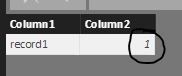
When moving from my query to power bi it seems that my formatting gets lost somehow and i cant understand why?
Can anybody help understand what i am missing here to ensure in power bi values are shown as a %?
Data shown in query editor:
Data shown in power bi:
Solved! Go to Solution.
Yeah, I've seen that with percents sometimes. Solution is to select the column, go to Modeling tab and click the % button in the Formatting area.
Thanks i feel really stupid now. appreciate your reply though.
I wouldn't feel that way at all, I agree that it's annoying that the formatting doesn't flow through.
If you have recently started exploring Fabric, we'd love to hear how it's going. Your feedback can help with product improvements.
A new Power BI DataViz World Championship is coming this June! Don't miss out on submitting your entry.
Share feedback directly with Fabric product managers, participate in targeted research studies and influence the Fabric roadmap.
| User | Count |
|---|---|
| 48 | |
| 45 | |
| 41 | |
| 20 | |
| 17 |
| User | Count |
|---|---|
| 69 | |
| 63 | |
| 32 | |
| 31 | |
| 23 |