Join us at FabCon Atlanta from March 16 - 20, 2026, for the ultimate Fabric, Power BI, AI and SQL community-led event. Save $200 with code FABCOMM.
Register now!Learn from the best! Meet the four finalists headed to the FINALS of the Power BI Dataviz World Championships! Register now
Hello i am new to poewr bi and seem to be struggling with what seems a simple matter.
When moving from my query to power bi it seems that my formatting gets lost somehow and i cant understand why?
Can anybody help understand what i am missing here to ensure in power bi values are shown as a %?
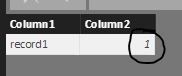
Data shown in query editor:
Data shown in power bi:
Solved! Go to Solution.
Yeah, I've seen that with percents sometimes. Solution is to select the column, go to Modeling tab and click the % button in the Formatting area.
Thanks i feel really stupid now. appreciate your reply though.
I wouldn't feel that way at all, I agree that it's annoying that the formatting doesn't flow through.
Share feedback directly with Fabric product managers, participate in targeted research studies and influence the Fabric roadmap.
Check out the February 2026 Power BI update to learn about new features.
| User | Count |
|---|---|
| 66 | |
| 60 | |
| 45 | |
| 19 | |
| 15 |
| User | Count |
|---|---|
| 108 | |
| 108 | |
| 41 | |
| 30 | |
| 27 |