Get certified for free when you join Fabric Data Days 2026 and dive into Fabric, Power BI, SQL, AI, and other essential data skills.
Join nowJuly 28 - August 9 | Final Round of the Power BI Dataviz World Championships. This is your chance. Learn more
Hi,
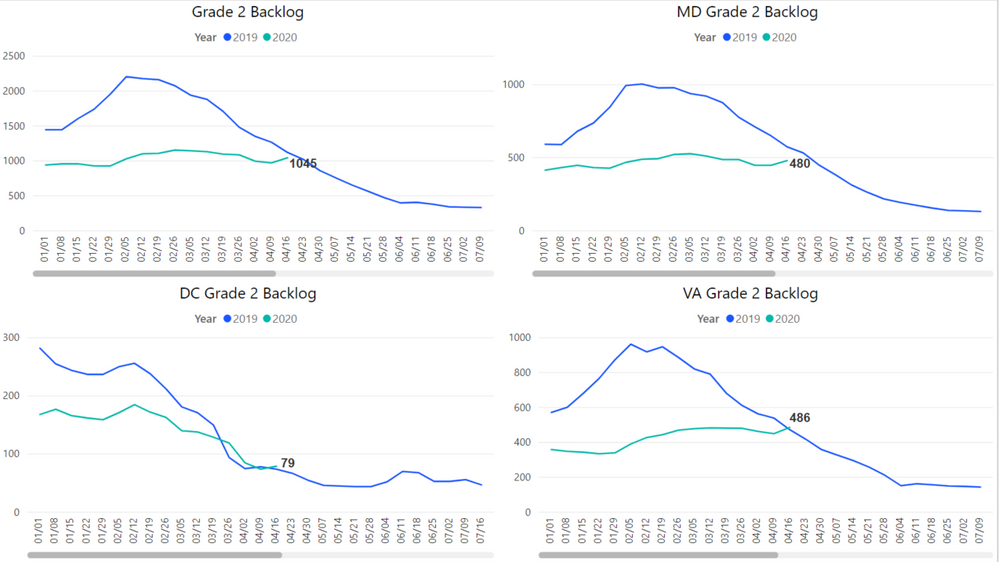
I am trying to display Weekly data, but when I try to fit multiple graphs onto one page, it does not shrink with the size of the graph like Excel does.
Is there a way to shrink the graph so there is no scroll bar on the bottom?
I have tried to display the graph monthly, but it thorws the data off...
Thank you!
Sarah
Solved! Go to Solution.
Hi @Anonymous,
I suggest you create an idea for it in Power BI forum and it will make this feature coming sooner:https://ideas.powerbi.com/forums/265200-power-bi-ideas.
If this post helps, then please consider Accept it as the solution to help the other members find it more quickly.
Best Regards,
Dedmon Dai
Hi @Anonymous,
I suggest you create an idea for it in Power BI forum and it will make this feature coming sooner:https://ideas.powerbi.com/forums/265200-power-bi-ideas.
If this post helps, then please consider Accept it as the solution to help the other members find it more quickly.
Best Regards,
Dedmon Dai
darn:(
Join us in Barcelona for FabCon and SQLCon, the Fabric, Power BI, SQL, and AI community event. Save €200 with code FABCMTY200.
If you love stickers, then you will definitely want to check out our community sticker challenge, Barcelona edition!
Check out the July 2026 Power BI update to learn about new features.
| User | Count |
|---|---|
| 25 | |
| 23 | |
| 22 | |
| 17 | |
| 14 |
| User | Count |
|---|---|
| 25 | |
| 24 | |
| 20 | |
| 19 | |
| 19 |