cancel
Showing results for 
Search instead for 
Did you mean: 

Try your skills in the Power BI Dataviz World Championship! Round one ends June 26. Join now

Reply
GeorgeGokmen
Helper I
Helper I

Showing Data Source - Not Model

When you click on model, you can view your tables and relationships, I got this. 


At some point, somewhere (maybe PowerBI desktop, maybe online, maybe some other MS Office product), I saw the source of my PowerBI report in a beautiful visual but now I cannot find the same visual that shows the relation and folders that excel files are stored in as data source.

Can anyone show me how I can find/create how to visually show my data source map? This visual was designed like a flowchart. I looked everywhere including dashboards, delve, sharepoint, power automate, dynamic 365 but I still can't find. 


Thank you all.


#datasource #datamapping

2 ACCEPTED SOLUTIONS
MFelix
Super User
Super User

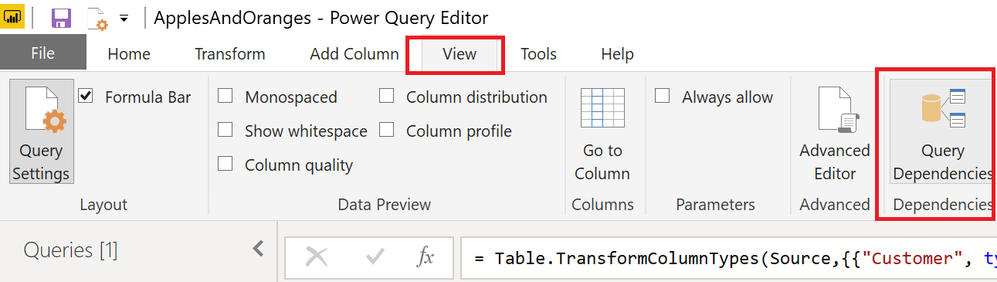
You are refering to query dependencies.

Check explanation on link below

https://exceleratorbi.com.au/query-dependency-view-power-bi-desktop/

Regards

Miguel Félix


Did I answer your question? Mark my post as a solution!

Proud to be a Super User!

Check out my blog: Power BI em Português


View solution in original post

Greg_Deckler
Community Champion
Community Champion

Query Dependencies in the Query Editor. View tab.


image.png


Follow on LinkedIn
@ me in replies or I'll lose your thread!!!
Instead of a Kudo, please vote for this idea
Become an expert!: Enterprise DNA
External Tools: MSHGQM
YouTube Channel!: Microsoft Hates Greg
Latest book!:
DAX For Humans

DAX is easy, CALCULATE makes DAX hard...

View solution in original post

3 REPLIES 3
Greg_Deckler
Community Champion
Community Champion

Query Dependencies in the Query Editor. View tab.


image.png


Follow on LinkedIn
@ me in replies or I'll lose your thread!!!
Instead of a Kudo, please vote for this idea
Become an expert!: Enterprise DNA
External Tools: MSHGQM
YouTube Channel!: Microsoft Hates Greg
Latest book!:
DAX For Humans

DAX is easy, CALCULATE makes DAX hard...
MFelix
Super User
Super User

You are refering to query dependencies.

Check explanation on link below

https://exceleratorbi.com.au/query-dependency-view-power-bi-desktop/

Regards

Miguel Félix


Did I answer your question? Mark my post as a solution!

Proud to be a Super User!

Check out my blog: Power BI em Português


Miguel, you are gold. Thank you so much, thank you billions. I can't thank you enough. 

Helpful resources

Announcements
Fabric Data Days is here Carousel

Data Days 2026

Don't miss out on Data Days, June 15 through August 7. Learn Fabric, Power BI, SQL, AI and more.

Power BI DataViz World Championships carousel

Power BI DataViz World Championships - June 2026

A new Power BI DataViz World Championship is coming this June! Don't miss out on submitting your entry.