Join the FabCon + SQLCon recap series. Up next: Power BI, Real-Time Intelligence, IQ and AI, and Data Factory take center stage. All sessions are available on-demand after the live show. Register now
When you click on model, you can view your tables and relationships, I got this.
At some point, somewhere (maybe PowerBI desktop, maybe online, maybe some other MS Office product), I saw the source of my PowerBI report in a beautiful visual but now I cannot find the same visual that shows the relation and folders that excel files are stored in as data source.
Can anyone show me how I can find/create how to visually show my data source map? This visual was designed like a flowchart. I looked everywhere including dashboards, delve, sharepoint, power automate, dynamic 365 but I still can't find.
Thank you all.
#datasource #datamapping
Solved! Go to Solution.
Regards
Miguel Félix
Proud to be a Super User!
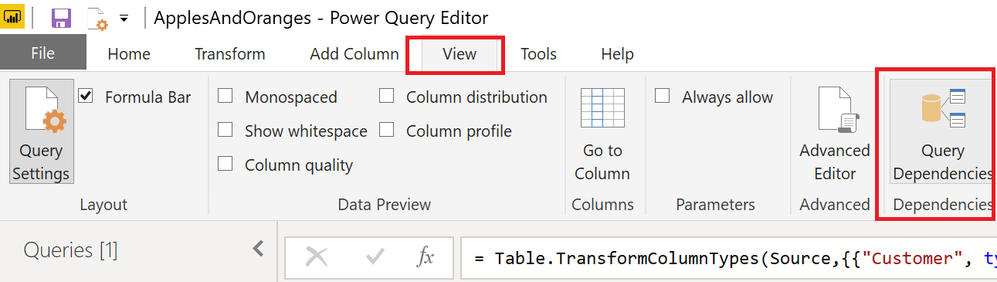
Check out my blog: Power BI em PortuguêsQuery Dependencies in the Query Editor. View tab.
Query Dependencies in the Query Editor. View tab.
Regards
Miguel Félix
Proud to be a Super User!
Check out my blog: Power BI em PortuguêsMiguel, you are gold. Thank you so much, thank you billions. I can't thank you enough.
Check out the April 2026 Power BI update to learn about new features.
If you have recently started exploring Fabric, we'd love to hear how it's going. Your feedback can help with product improvements.
A new Power BI DataViz World Championship is coming this June! Don't miss out on submitting your entry.
| User | Count |
|---|---|
| 40 | |
| 38 | |
| 31 | |
| 20 | |
| 15 |
| User | Count |
|---|---|
| 67 | |
| 58 | |
| 29 | |
| 27 | |
| 25 |