Join us at FabCon Atlanta from March 16 - 20, 2026, for the ultimate Fabric, Power BI, AI and SQL community-led event. Save $200 with code FABCOMM.
Register now!Get Fabric Certified for FREE during Fabric Data Days. Don't miss your chance! Request now
Hi, I have a data table that looks like this:
| Status | Number |
| New Sustainable | 3 |
| New Moderate | 7 |
| New Critical | 0 |
| Overdue Sustainable | 0 |
| Overdue Moderate | 2 |
| Overdue Critical | 5 |
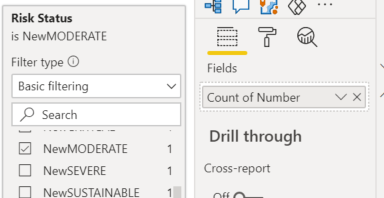
I want to create cards that show each of these values. but I can't get it to work. I've tried using 'Number' as the field for the card and filtering by the status, but that just displays 1. What do I need to do to get it to show correctly?
Solved! Go to Solution.
@Anonymous
You should filter each card based on its status and make an assignment of your number based on "Sum" instead of "count". Take a look at the picture below / download the sample file.
Did I answer your question? Mark my post as a solution! Appreciate your Kudos !
@Anonymous , Use Max or Sum and USe visual level filter
The information you have provided is not making the problem clear to me. Can you please explain with an example.
Appreciate your Kudos.
In the table I provided, the status 'New Moderate' has a value of 7. I want to create a card that will show '7'.
When I go to create my card, I select 'Number' as the field, and apply a visual filter to select 'New Moderate'. When I do this, the card shows '1', instead of the expected '7'
@Anonymous
You should filter each card based on its status and make an assignment of your number based on "Sum" instead of "count". Take a look at the picture below / download the sample file.
Did I answer your question? Mark my post as a solution! Appreciate your Kudos !
Check out the November 2025 Power BI update to learn about new features.
Advance your Data & AI career with 50 days of live learning, contests, hands-on challenges, study groups & certifications and more!