Share feedback directly with Fabric product managers, participate in targeted research studies and influence the Fabric roadmap.
Sign up nowGet Fabric certified for FREE! Don't miss your chance! Learn more
Hi All,
I have a dataset like below.
| Year | Type | Amount |
| 2020 | A | 10 |
| 2020 | B | 20 |
| 2020 | C | 30 |
| 2020 | D | 40 |
| 2020 | E | 50 |
| 2021 | A | 60 |
| 2021 | B | 70 |
| 2021 | C | 80 |
Now, I create a measure to calculate the Last Year (2020) result and show it together with this year data like below.
Slicer = 2021
| Type | This Year | Last Year |
| A | 60 | 10 |
| B | 70 | 20 |
| C | 80 | 30 |
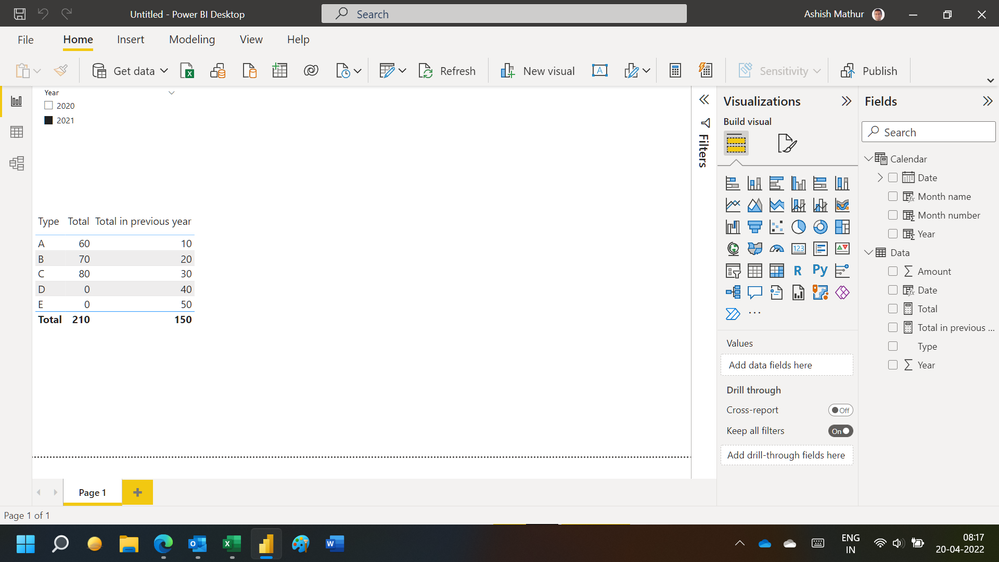
However, I would like the "Type" also contain what 2020 have but 2021 no record like below.
| Type | This Year | Last Year |
| A | 60 | 10 |
| B | 70 | 20 |
| C | 80 | 30 |
| D | 0 | 40 |
| E | 0 | 50 |
Anyone how to do it?
Solved! Go to Solution.
Hi,
You may download my PBI file from here.
Hope this helps.
Hi,
You may download my PBI file from here.
Hope this helps.
That what I need. Thank you.
You are welcome.
Try adding +0 in your measure formula and see if it works
Hi, @KH_Mike
Can you try this? Right click on Type field:
https://docs.microsoft.com/en-us/power-bi/create-reports/desktop-show-items-no-data
Proud to be a Super User!
If you love stickers, then you will definitely want to check out our Community Sticker Challenge!
Check out the January 2026 Power BI update to learn about new features.
| User | Count |
|---|---|
| 65 | |
| 64 | |
| 49 | |
| 21 | |
| 18 |
| User | Count |
|---|---|
| 119 | |
| 117 | |
| 38 | |
| 36 | |
| 29 |