Join us at FabCon Atlanta from March 16 - 20, 2026, for the ultimate Fabric, Power BI, AI and SQL community-led event. Save $200 with code FABCOMM.
Register now!Vote for your favorite vizzies from the Power BI Dataviz World Championship submissions. Vote now!
Hi All,
I have a dataset like below.
| Year | Type | Amount |
| 2020 | A | 10 |
| 2020 | B | 20 |
| 2020 | C | 30 |
| 2020 | D | 40 |
| 2020 | E | 50 |
| 2021 | A | 60 |
| 2021 | B | 70 |
| 2021 | C | 80 |
Now, I create a measure to calculate the Last Year (2020) result and show it together with this year data like below.
Slicer = 2021
| Type | This Year | Last Year |
| A | 60 | 10 |
| B | 70 | 20 |
| C | 80 | 30 |
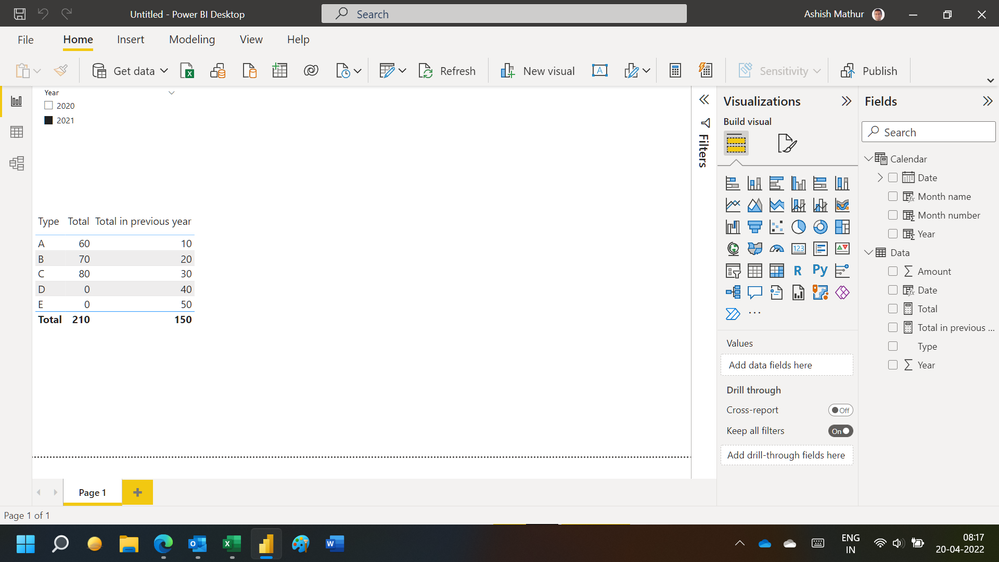
However, I would like the "Type" also contain what 2020 have but 2021 no record like below.
| Type | This Year | Last Year |
| A | 60 | 10 |
| B | 70 | 20 |
| C | 80 | 30 |
| D | 0 | 40 |
| E | 0 | 50 |
Anyone how to do it?
Solved! Go to Solution.
Hi,
You may download my PBI file from here.
Hope this helps.
Hi,
You may download my PBI file from here.
Hope this helps.
That what I need. Thank you.
You are welcome.
Try adding +0 in your measure formula and see if it works
Hi, @KH_Mike
Can you try this? Right click on Type field:
https://docs.microsoft.com/en-us/power-bi/create-reports/desktop-show-items-no-data
Proud to be a Super User!
Vote for your favorite vizzies from the Power BI World Championship submissions!
If you love stickers, then you will definitely want to check out our Community Sticker Challenge!
Check out the January 2026 Power BI update to learn about new features.
| User | Count |
|---|---|
| 57 | |
| 53 | |
| 42 | |
| 16 | |
| 16 |
| User | Count |
|---|---|
| 112 | |
| 106 | |
| 39 | |
| 36 | |
| 27 |