Join us in Barcelona for FabCon and SQLCon, September 28 - October 1, 2026.
This is best Fabric, Power BI, SQL and AI community event. How do we know? The last event sold out! Save €200 with code FABCMTY200.
Register now- Power BI forums
- Get Help with Power BI
- Desktop
- Service
- Report Server
- Power Query
- Mobile Apps
- Developer
- DAX Commands and Tips
- Custom Visuals Development Discussion
- Health and Life Sciences
- Power BI Spanish forums
- Translated Spanish Desktop
- Training and Consulting
- Instructor Led Training
- Dashboard in a Day for Women, by Women
- Galleries
- Data Stories Gallery
- Themes Gallery
- Contests Gallery
- QuickViz Gallery
- Quick Measures Gallery
- Visual Calculations Gallery
- Fabric Apps Gallery
- Notebook Gallery
- Translytical Task Flow Gallery
- TMDL Gallery
- R Script Showcase
- Webinars and Video Gallery
- Ideas
- Custom Visuals Ideas (read-only)
- Issues
- Issues
- Events
- Upcoming Events
The Fabric community is now in read-only for platform upgrade. Learn more
- Power BI forums
- Forums
- Get Help with Power BI
- Desktop
- Re: Shopify Data Modelling
- Subscribe to RSS Feed
- Mark Topic as New
- Mark Topic as Read
- Float this Topic for Current User
- Bookmark
- Subscribe
- Printer Friendly Page


- Mark as New
- Bookmark
- Subscribe
- Mute
- Subscribe to RSS Feed
- Permalink
Shopify Data Modelling
Hi,
Has anyone built a data model using to shopify tables. Should i merge the tables or use relationships for them. I've not used a data model like this prior so any help would be much appreciated.


- Mark as New
- Bookmark
- Subscribe
- Mute
- Subscribe to RSS Feed
- Permalink
Use relationships to build a star schema data model for Shopify tables—do not merge them.
Recommended Star Schema
Fact Table: Orders (or Order Line Items) with measures like Revenue, Quantity, containing foreign keys.
Dimension Tables:
Customers (CustomerID → Orders)
Products (ProductID → Order Line Items)
Date (OrderDate → Orders)
Locations/Shipping (if available)
Setup Steps
Import Shopify tables via Web connector (Orders, Products, Customers, Line Items).
Create 1:many relationships: Products[ID] → LineItems[ProductID], Customers[ID] → Orders[CustomerID], Orders[ID] → LineItems[OrderID].
Hide redundant columns (IDs in fact tables), mark Date table, set filter directions from dimensions to facts.


- Mark as New
- Bookmark
- Subscribe
- Mute
- Subscribe to RSS Feed
- Permalink
Hi @Jameswh91 , there is actually a ready-made solution that might save you a lot of time. You can use a Shopify Power BI template that already includes the key Shopify tables and modeled relationships, so you can plug in your data and get started right away: https://vidi-corp.com/shopify-analytics-dashboards/
It can be a great shortcut if you are not familiar with modeling Shopify data or just want to speed up the process.


- Mark as New
- Bookmark
- Subscribe
- Mute
- Subscribe to RSS Feed
- Permalink
This Power BI connector comes with a free dashboard which has the data model created. I would recommend to look into it: https://vidi-corp.com/shopify-power-bi-connector/


- Mark as New
- Bookmark
- Subscribe
- Mute
- Subscribe to RSS Feed
- Permalink
Hi @Jameswh91 I know this reply is very late lol but were you able to find a solution? Since there’s no direct connection to Shopify anymore, you will have to look for another way. As a workaround, maybe you can try to test your connection with a 3rd party connector. I've tried windsor.ai, supemetrics (which doesn't have PBI as a destination, so you first have to export to Google Sheets and then export to PBI) and funnel.io. I stayed with windsor because it is much cheaper so just to let you know other options. In case you wonder, to make the connection first search for the Shopify connector in the data sources list:
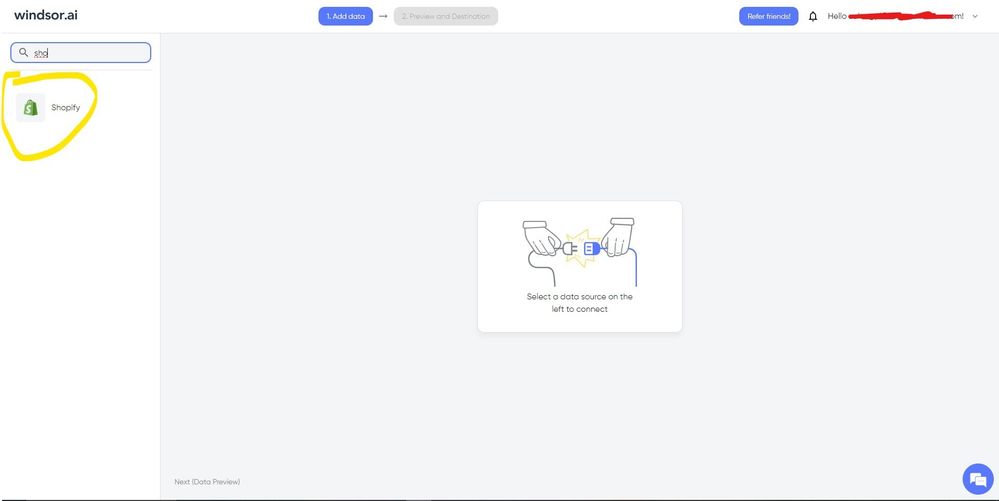
After that, just grant access to your Bing Ads account using your credentials, then on preview and destination page you will see a preview of your Shopify fields:
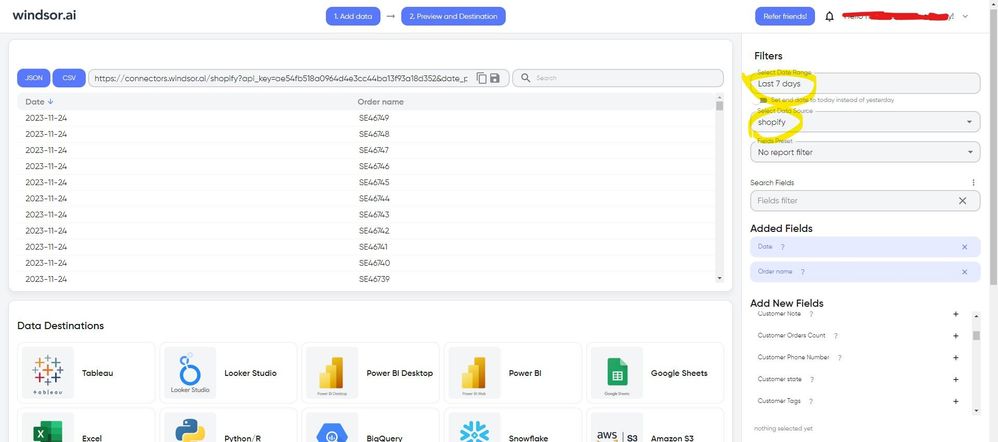
There just select the fields you need. Finally, just select PBI as your data destination and finally just copy and paste the url on PBI --> Get Data --> Web --> Paste the url.


- Mark as New
- Bookmark
- Subscribe
- Mute
- Subscribe to RSS Feed
- Permalink
It's great to see discussions on utilizing Power BI for analyzing and visualizing Shopify data. If you're interested in diving deeper into the pros and cons of using Shopify as an e-commerce platform, I recommend checking out the article https://claspo.io/blog/16-shopify-pros-and-cons-reviewed/. Exploring the pros and cons will give you a comprehensive understanding of the platform's capabilities and potential limitations. In past its really help me in my business
- Mark as New
- Bookmark
- Subscribe
- Mute
- Subscribe to RSS Feed
- Permalink
I found this post on Shopify data modeling in Power BI quite informative. As a Power BI user, it's crucial to effectively model and transform your data to extract meaningful insights. Understanding the underlying structure and relationships of your Shopify data is essential for creating accurate and insightful visualizations. I appreciate the tips and discussions shared in this post, particularly the focus on defining relationships, managing data granularity, and optimizing performance

- Mark as New
- Bookmark
- Subscribe
- Mute
- Subscribe to RSS Feed
- Permalink
Thank you for sharing your experience and insights on Shopify data modeling in Power BI. Data modeling is a crucial step in creating meaningful visualizations and gaining valuable insights from your Shopify data. It's great to see the community discussing various approaches and best practices for data modeling in Power BI with Shopify
- Mark as New
- Bookmark
- Subscribe
- Mute
- Subscribe to RSS Feed
- Permalink
Hi @Jameswh91
You can use Power BI Connector with a data model where the relations are built automatically.
Liubov
- Mark as New
- Bookmark
- Subscribe
- Mute
- Subscribe to RSS Feed
- Permalink
i'm not sure why you would need a data model for this, or merging table, if there is free shopify to Power bi connector.
try this app https://apps.shopify.com/windsor-connector
this is the how to https://windsor.ai/connect-shopify-to-power-bi/
and a free template to get you started https://appsource.microsoft.com/en-us/product/power-bi/windsorgroupgmbh1585043281642.shopify-store-o...


- Mark as New
- Bookmark
- Subscribe
- Mute
- Subscribe to RSS Feed
- Permalink
Hi @Jameswh91 ,
Pls refer the below and check if it is helpful:
https://panoply.io/shopify-analytics-guide/understanding-the-shopify-data-model/
https://community.powerbi.com/t5/Desktop/Unable-connect-Shopify-to-Power-BI/td-p/2232960
Best Regards
Lucien

Helpful resources

FabCon & SQLCon – Barcelona 2026
Join us in Barcelona for FabCon and SQLCon, the Fabric, Power BI, SQL, and AI community event. Save €200 with code FABCMTY200.

Power BI DataViz World Championships - June 2026
A new Power BI DataViz World Championship is coming this June! Don't miss out on submitting your entry.

| User | Count |
|---|---|
| 23 | |
| 22 | |
| 14 | |
| 14 | |
| 13 |


| User | Count |
|---|---|
| 47 | |
| 39 | |
| 24 | |
| 20 | |
| 20 |


