Share feedback directly with Fabric product managers, participate in targeted research studies and influence the Fabric roadmap.
Sign up nowGet Fabric certified for FREE! Don't miss your chance! Learn more
I have my powerbi linked to a list in SharePoint. One of my SharePoint columns is a Person field that can have more than one person attached to it. When I expand it in PowerBI, how can I then display it in a table visualization by project without it creating multiple entries?
It is laying out like this:
Project 1 Resource 1
Project 1 Resource 2
Project 1 Resource 3
Project 1 Resource 4
Project 2 Resource 1
Project 2 Resource 2
Project 3 Resource 1
Project 3 Resource 2
I would like it to look like this:
Project 1 Resource 1, Resource 2, Resource 3, Resource 4
Project 2 Resource 1, Resource 2
Project 3 Resource 1, Resource 2
You may add a measure as shown below.
Measure = CONCATENATEX ( Table1, Table1[Column2], ", " )
Thank you for your suggestion. When I tried this:
Resources = CONCATENATEX(PACEMasterProjectList,PACEMasterProjectList[ResourceAssigned],"; ")
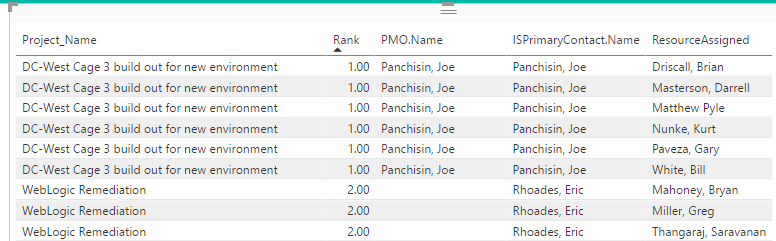
List went from this:
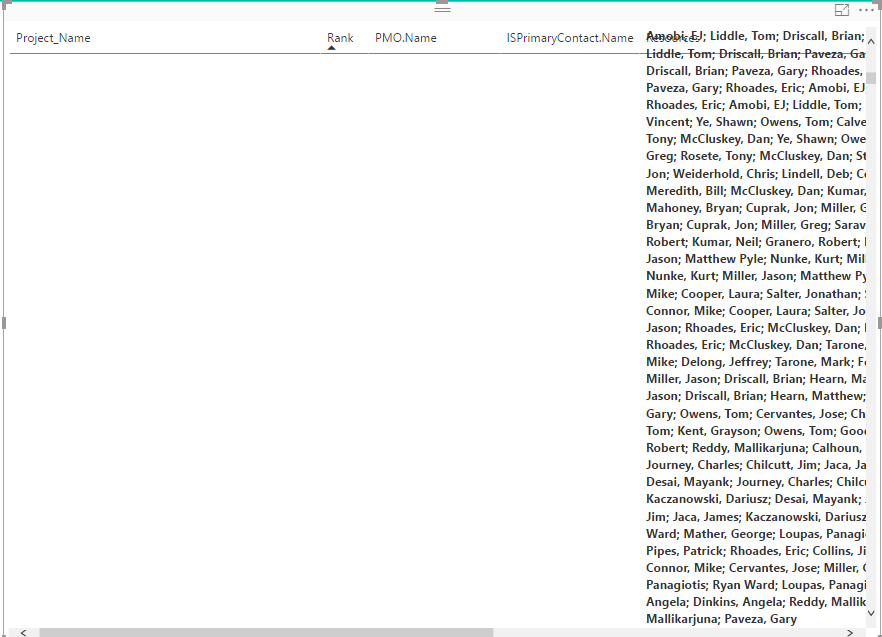
to this:
Make sure it is a measure, not calculated column.
Share feedback directly with Fabric product managers, participate in targeted research studies and influence the Fabric roadmap.
| User | Count |
|---|---|
| 62 | |
| 62 | |
| 42 | |
| 21 | |
| 18 |
| User | Count |
|---|---|
| 120 | |
| 113 | |
| 38 | |
| 29 | |
| 28 |