Learn from the best! Meet the four finalists headed to the FINALS of the Power BI Dataviz World Championships! Register now
I have my powerbi linked to a list in SharePoint. One of my SharePoint columns is a Person field that can have more than one person attached to it. When I expand it in PowerBI, how can I then display it in a table visualization by project without it creating multiple entries?
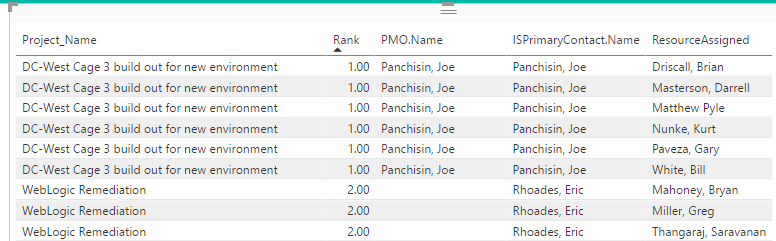
It is laying out like this:
Project 1 Resource 1
Project 1 Resource 2
Project 1 Resource 3
Project 1 Resource 4
Project 2 Resource 1
Project 2 Resource 2
Project 3 Resource 1
Project 3 Resource 2
I would like it to look like this:
Project 1 Resource 1, Resource 2, Resource 3, Resource 4
Project 2 Resource 1, Resource 2
Project 3 Resource 1, Resource 2
You may add a measure as shown below.
Measure = CONCATENATEX ( Table1, Table1[Column2], ", " )
Thank you for your suggestion. When I tried this:
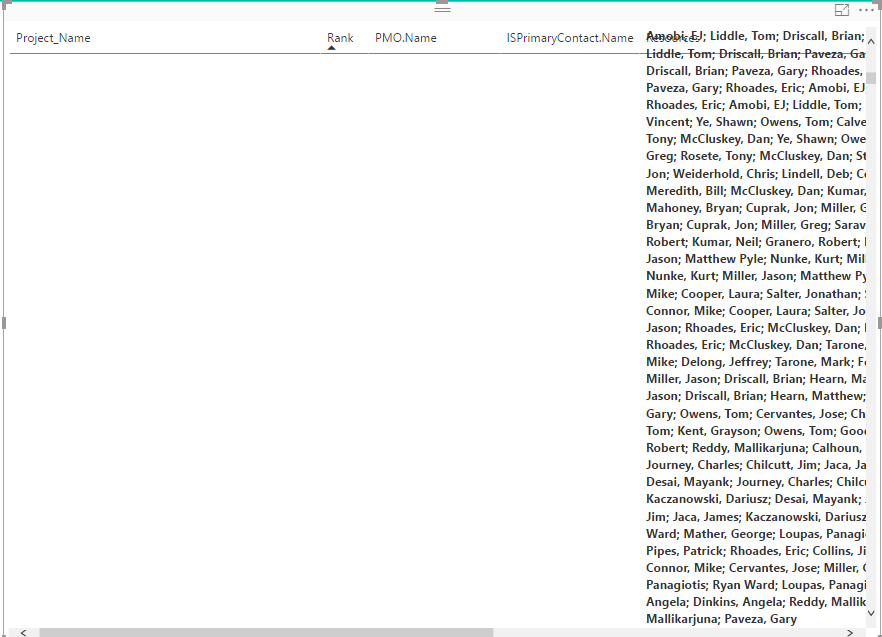
Resources = CONCATENATEX(PACEMasterProjectList,PACEMasterProjectList[ResourceAssigned],"; ")
List went from this:
to this:
Make sure it is a measure, not calculated column.
A new Power BI DataViz World Championship is coming this June! Don't miss out on submitting your entry.
Share feedback directly with Fabric product managers, participate in targeted research studies and influence the Fabric roadmap.
| User | Count |
|---|---|
| 45 | |
| 35 | |
| 30 | |
| 15 | |
| 15 |
| User | Count |
|---|---|
| 58 | |
| 55 | |
| 38 | |
| 21 | |
| 21 |