We've captured the moments from FabCon & SQLCon that everyone is talking about, and we are bringing them to the community, live and on-demand. Starts on April 14th. Register now
I've found that if I use Excel files on SharePoint (using the SharePoint folder connection in Power BI), that the connection breaks if I add any other files into that SharePoint (removing them resolves this). Is there any way around this? Or, is there a better datasource that can be easily be updated by non-power users we can utilize, hopefully free but if we need other licenses that's okay too.
Solved! Go to Solution.
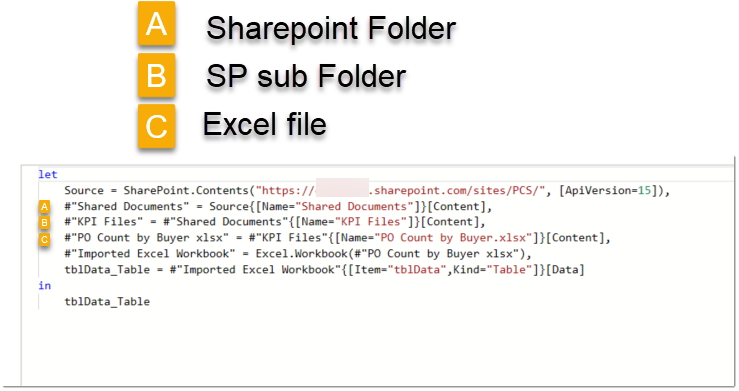
@CarloA93 - Not sure if this is the issue but I usually grab Excel files within SharePoint as the below image. You should only need the Source line as the subsequent lines are generated by the GUI as you click through to find the Excel file.
Proud to be a Super User!
@CarloA93 - Not sure if this is the issue but I usually grab Excel files within SharePoint as the below image. You should only need the Source line as the subsequent lines are generated by the GUI as you click through to find the Excel file.
Proud to be a Super User!
If you have recently started exploring Fabric, we'd love to hear how it's going. Your feedback can help with product improvements.
A new Power BI DataViz World Championship is coming this June! Don't miss out on submitting your entry.
Share feedback directly with Fabric product managers, participate in targeted research studies and influence the Fabric roadmap.
| User | Count |
|---|---|
| 53 | |
| 38 | |
| 33 | |
| 17 | |
| 17 |
| User | Count |
|---|---|
| 67 | |
| 62 | |
| 38 | |
| 34 | |
| 22 |