Join us at FabCon Atlanta from March 16 - 20, 2026, for the ultimate Fabric, Power BI, AI and SQL community-led event. Save $200 with code FABCOMM.
Register now!The Power BI Data Visualization World Championships is back! It's time to submit your entry. Live now!
I've found that if I use Excel files on SharePoint (using the SharePoint folder connection in Power BI), that the connection breaks if I add any other files into that SharePoint (removing them resolves this). Is there any way around this? Or, is there a better datasource that can be easily be updated by non-power users we can utilize, hopefully free but if we need other licenses that's okay too.
Solved! Go to Solution.
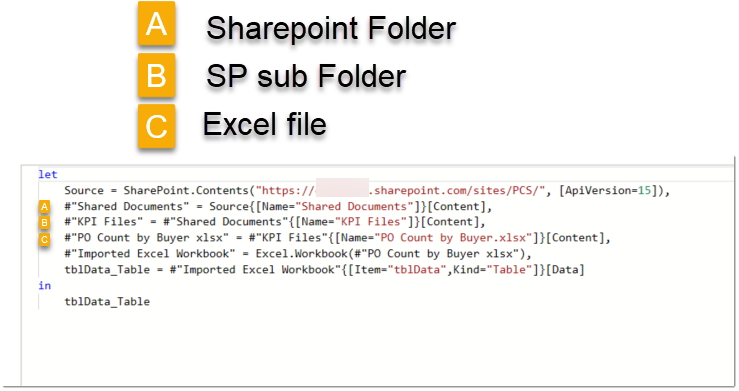
@CarloA93 - Not sure if this is the issue but I usually grab Excel files within SharePoint as the below image. You should only need the Source line as the subsequent lines are generated by the GUI as you click through to find the Excel file.
Proud to be a Super User!
@CarloA93 - Not sure if this is the issue but I usually grab Excel files within SharePoint as the below image. You should only need the Source line as the subsequent lines are generated by the GUI as you click through to find the Excel file.
Proud to be a Super User!
The Power BI Data Visualization World Championships is back! It's time to submit your entry.
Check out the January 2026 Power BI update to learn about new features.
| User | Count |
|---|---|
| 61 | |
| 48 | |
| 35 | |
| 25 | |
| 23 |
| User | Count |
|---|---|
| 134 | |
| 110 | |
| 59 | |
| 39 | |
| 32 |