This is best Fabric, Power BI, SQL and AI community event. How do we know? The last event sold out! Save €200 with code FABCMTY200.
Register nowA new Data Days event is coming soon! This time we’re going bigger than ever. Fabric, Power BI, SQL, AI and more. Don't miss out.
Hi,
I need to define a variable for the <result_columnName> in LOOKUPVALUE.
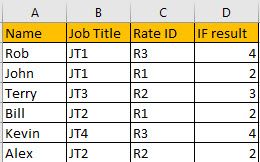
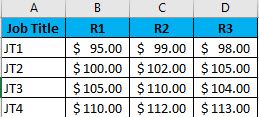
I am working with 2 tables: Job Titles (JT) with Regional Rates (RR) and Employees with their JT and RR. In Excel I created an IF statement in the Employee table to provide VLOOKUP the column it needs to find the RR. VLOOKUP would return the Employees RR.
Formulas in Excel in Employee Table
"If(RR=R1,2,IF(RR=R2,3,IF(RR=R3,4,)))"
"VLOOKUP(A2,JobTitles!A2:5,D2,False)"
Employee Table
Job Table
Thanks for the help
Solved! Go to Solution.
You should unpivot the second table: https://radacad.com/pivot-and-unpivot-with-power-bi
Then you will able to use lookup
https://docs.microsoft.com/en-us/dax/lookupvalue-function-dax
You should unpivot the second table: https://radacad.com/pivot-and-unpivot-with-power-bi
Then you will able to use lookup
https://docs.microsoft.com/en-us/dax/lookupvalue-function-dax
Thank you,
Onces Pivoted I was able to successfully build a measure and a column.
For the Measure I needed to create 2 variable measures
"MAX('Employee Table[Job Title])" and
"MAX('Employee Table[Rate ID])"
then I created the measure
"LOOKUPVALUE('JobTable[Rate Value], 'JobTable[Job Title}, Measure[Job Title], JobTable[Rate ID}, Measure[Rate])"
For the column I didn't need the measure names and used the column names from the Employee Table.
Hi,
sometimes it makes sense to restructure your data to work best with Power BI . I would unpivot the data in the Job Type / Rate Matrix, so you have a row for each rate per job. as you are using 2 columns to lookup then you could use SELECTCOLUMNS to return a value into a new column in your table from the rate table using the Job Type and Rate as filters.
Check out the May 2026 Power BI update to learn about new features.
Sign up to receive a private message when registration opens and key events begin.
If you have recently started exploring Fabric, we'd love to hear how it's going. Your feedback can help with product improvements.
| User | Count |
|---|---|
| 32 | |
| 26 | |
| 23 | |
| 22 | |
| 15 |
| User | Count |
|---|---|
| 63 | |
| 45 | |
| 28 | |
| 24 | |
| 22 |