Get certified for free when you join Fabric Data Days 2026 and dive into Fabric, Power BI, SQL, AI, and other essential data skills.
Join nowJuly 28 - August 9 | Final Round of the Power BI Dataviz World Championships. This is your chance. Learn more
Hi,
I need to define a variable for the <result_columnName> in LOOKUPVALUE.
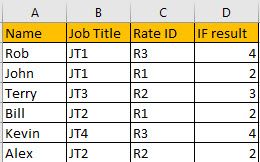
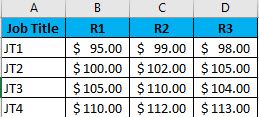
I am working with 2 tables: Job Titles (JT) with Regional Rates (RR) and Employees with their JT and RR. In Excel I created an IF statement in the Employee table to provide VLOOKUP the column it needs to find the RR. VLOOKUP would return the Employees RR.
Formulas in Excel in Employee Table
"If(RR=R1,2,IF(RR=R2,3,IF(RR=R3,4,)))"
"VLOOKUP(A2,JobTitles!A2:5,D2,False)"
Employee Table
Job Table
Thanks for the help
Solved! Go to Solution.
You should unpivot the second table: https://radacad.com/pivot-and-unpivot-with-power-bi
Then you will able to use lookup
https://docs.microsoft.com/en-us/dax/lookupvalue-function-dax
You should unpivot the second table: https://radacad.com/pivot-and-unpivot-with-power-bi
Then you will able to use lookup
https://docs.microsoft.com/en-us/dax/lookupvalue-function-dax
Thank you,
Onces Pivoted I was able to successfully build a measure and a column.
For the Measure I needed to create 2 variable measures
"MAX('Employee Table[Job Title])" and
"MAX('Employee Table[Rate ID])"
then I created the measure
"LOOKUPVALUE('JobTable[Rate Value], 'JobTable[Job Title}, Measure[Job Title], JobTable[Rate ID}, Measure[Rate])"
For the column I didn't need the measure names and used the column names from the Employee Table.
Hi,
sometimes it makes sense to restructure your data to work best with Power BI . I would unpivot the data in the Job Type / Rate Matrix, so you have a row for each rate per job. as you are using 2 columns to lookup then you could use SELECTCOLUMNS to return a value into a new column in your table from the rate table using the Job Type and Rate as filters.
Join us in Barcelona for FabCon and SQLCon, the Fabric, Power BI, SQL, and AI community event. Save €200 with code FABCMTY200.
If you love stickers, then you will definitely want to check out our community sticker challenge, Barcelona edition!
Check out the July 2026 Power BI update to learn about new features.
| User | Count |
|---|---|
| 31 | |
| 28 | |
| 24 | |
| 23 | |
| 19 |
| User | Count |
|---|---|
| 44 | |
| 32 | |
| 18 | |
| 17 | |
| 17 |