Join us at FabCon Atlanta from March 16 - 20, 2026, for the ultimate Fabric, Power BI, AI and SQL community-led event. Save $200 with code FABCOMM.
Register now!Vote for your favorite vizzies from the Power BI Dataviz World Championship submissions. Vote now!
Hello!
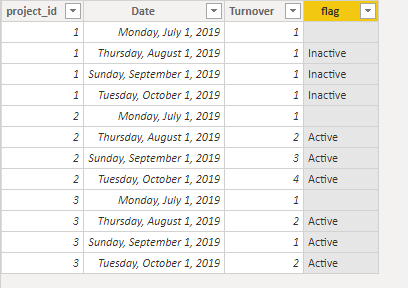
I have a table where I have period wise project wise finance data. I need to set up a flag (Calculated column) Active/Inactive based on the value of one column called Turnover. The condition is if there is a change (+/-) in the Turnover value for a project for last 3 months then the set the project as Active else set it Inactive. How can I write the condition?
Regards
Pia
Solved! Go to Solution.
Hi @Anonymous ,
To create a calculated column as below.
flag =
VAR last3month =
EDATE ( TODAY (), -3 )
VAR disc =
CALCULATE (
DISTINCTCOUNT ( 'Table'[Turnover ] ),
FILTER (
'Table',
'Table'[project_id] = EARLIER ( 'Table'[project_id] )
&& 'Table'[Date] >= last3month
&& 'Table'[Date] <= TODAY ()
)
)
RETURN
IF (
'Table'[Date] >= last3month
&& 'Table'[Date] <= TODAY (),
IF ( disc > 1, "Active", "Inactive" ),
BLANK ()
)
Hi,
Why do you want that as a calculated column and not a measure?
Hi @Anonymous ,
To create a calculated column as below.
flag =
VAR last3month =
EDATE ( TODAY (), -3 )
VAR disc =
CALCULATE (
DISTINCTCOUNT ( 'Table'[Turnover ] ),
FILTER (
'Table',
'Table'[project_id] = EARLIER ( 'Table'[project_id] )
&& 'Table'[Date] >= last3month
&& 'Table'[Date] <= TODAY ()
)
)
RETURN
IF (
'Table'[Date] >= last3month
&& 'Table'[Date] <= TODAY (),
IF ( disc > 1, "Active", "Inactive" ),
BLANK ()
)
Hello @v-frfei-msft
the data type for project nr. has changed to integer to string. and now the formula doesnt work. how can i change the formula?
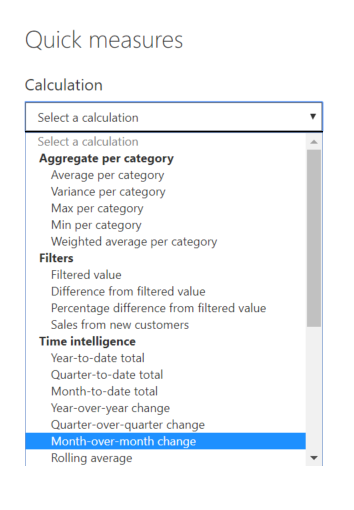
1. Create Quick measure as shown in the picture.
2. Pass only Dates Dim/Calendar table date as Date value
3. Value field as 'Turnover
4. Power BI Creates a Measure [Turnover MoM%]
Note: If you dont have CALENDAR table, manully derive the value MoM%
5. using this Measure derive your desired calculated column as below:
StatusFlag = IF([Turnover MoM%] = 0,"Inactive", "Active")
Hi @Anonymous
But where can I define that comapre the values for only last 3 months?
Regards
Pia
Vote for your favorite vizzies from the Power BI World Championship submissions!
If you love stickers, then you will definitely want to check out our Community Sticker Challenge!
Check out the January 2026 Power BI update to learn about new features.
| User | Count |
|---|---|
| 64 | |
| 56 | |
| 43 | |
| 20 | |
| 17 |
| User | Count |
|---|---|
| 123 | |
| 108 | |
| 44 | |
| 32 | |
| 26 |