cancel
Showing results for 
Search instead for 
Did you mean: 

The Power BI Data Visualization World Championships is back! Get ahead of the game and start preparing now! Learn more

Reply
Anonymous
Not applicable

Set a conditional flag

Hello!

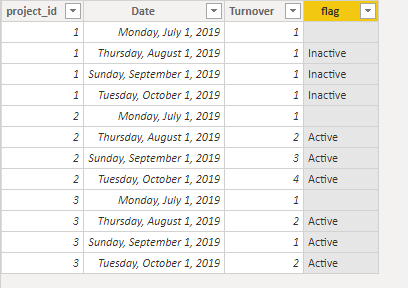
I have a table where I have period wise project wise finance data. I need to set up a flag (Calculated column) Active/Inactive based on the value of one column called Turnover. The condition is if there is a change (+/-) in the Turnover value for a project for last 3 months then the set the project as Active else set it Inactive. How can I write the condition?


Regards

Pia

1 ACCEPTED SOLUTION
v-frfei-msft
Community Support
Community Support

Hi @Anonymous ,


To create a calculated column as below.

flag = 
VAR last3month =
    EDATE ( TODAY (), -3 )
VAR disc =
    CALCULATE (
        DISTINCTCOUNT ( 'Table'[Turnover ] ),
        FILTER (
            'Table',
            'Table'[project_id] = EARLIER ( 'Table'[project_id] )
                && 'Table'[Date] >= last3month
                && 'Table'[Date] <= TODAY ()
        )
    )
RETURN
    IF (
        'Table'[Date] >= last3month
            && 'Table'[Date] <= TODAY (),
        IF ( disc > 1, "Active", "Inactive" ),
        BLANK ()
    )

Capture.PNG


Community Support Team _ Frank
If this post helps, then please consider Accept it as the solution to help the others find it more quickly.

View solution in original post

5 REPLIES 5
Ashish_Mathur
Super User
Super User

Hi,

Why do you want that as a calculated column and not a measure?


Regards,
Ashish Mathur
http://www.ashishmathur.com
https://www.linkedin.com/in/excelenthusiasts/
v-frfei-msft
Community Support
Community Support

Hi @Anonymous ,


To create a calculated column as below.

flag = 
VAR last3month =
    EDATE ( TODAY (), -3 )
VAR disc =
    CALCULATE (
        DISTINCTCOUNT ( 'Table'[Turnover ] ),
        FILTER (
            'Table',
            'Table'[project_id] = EARLIER ( 'Table'[project_id] )
                && 'Table'[Date] >= last3month
                && 'Table'[Date] <= TODAY ()
        )
    )
RETURN
    IF (
        'Table'[Date] >= last3month
            && 'Table'[Date] <= TODAY (),
        IF ( disc > 1, "Active", "Inactive" ),
        BLANK ()
    )

Capture.PNG


Community Support Team _ Frank
If this post helps, then please consider Accept it as the solution to help the others find it more quickly.
Anonymous
Not applicable

Hello @v-frfei-msft 

the data type for project nr. has changed to integer to string. and now the formula doesnt work. how can i change the formula?


Anonymous
Not applicable

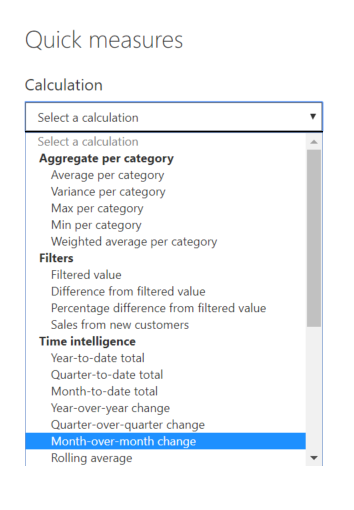
1. Create Quick measure  as shown in the picture.
2. Pass only Dates Dim/Calendar table date as Date value
3. Value field as 'Turnover
4. Power BI Creates a Measure [Turnover MoM%]

Note: If you dont have CALENDAR table, manully derive the value MoM%

5. using this Measure derive your desired calculated column as below:
StatusFlag = IF([Turnover MoM%] = 0,"Inactive", "Active")Mom%.png

Anonymous
Not applicable

Hi @Anonymous 

But where can I define that comapre the values for only last 3 months?


Regards

Pia

Helpful resources

Announcements
Power BI DataViz World Championships

Power BI Dataviz World Championships

The Power BI Data Visualization World Championships is back! Get ahead of the game and start preparing now!

December 2025 Power BI Update Carousel

Power BI Monthly Update - December 2025

Check out the December 2025 Power BI Holiday Recap!

FabCon Atlanta 2026 carousel

FabCon Atlanta 2026

Join us at FabCon Atlanta, March 16-20, for the ultimate Fabric, Power BI, AI and SQL community-led event. Save $200 with code FABCOMM.

Top Solution Authors