cancel
Showing results for 
Search instead for 
Did you mean: 

The Power BI Data Visualization World Championships is back! Get ahead of the game and start preparing now! Learn more

Reply
PBI_Curious
Frequent Visitor

Service Level KPIs

I need to create a bunch of Service Level KPIs.  They will need to incorporate filters like status and type but what they all have in common is that the Report Month needs to match the slicer setting on the page (which takes care of one date filter aspect) BUT additionally a filter regarding the Open date and/or the Close date.


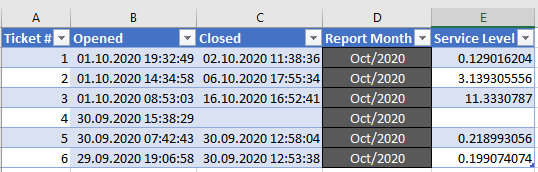
Screenshot of sample data.png

For example the correct count for October items would be Report Month shows Oct/2020 but ALSO Opened >= selected report period AND < report period+1day.


This currently works in Excel along these lines: 

excel formula is [Opened],">="&TrackingMonth,Track_Data[Opened],"<"&EDATE(TrackingMonth)
 
Additonally, the Service Level formula in the last column is the following.  I will need to get this working in PowerBI.

=IF(C2<>"",IF(INT(B2)=INT(C2),C2-B2,((C2-B2)*24-((1+INT(C2)-INT(B2))-NETWORKDAYS(B2,C2))*24+IF(NETWORKDAYS(B2,B2)=0,HOUR(B2)-8,0)-IF(AND(NETWORKDAYS(B2,B2)=1,HOUR(B2)<8), 8-HOUR(B2),0)-IF(AND(NETWORKDAYS(B2,B2)=1,HOUR(B2)>15), 32-HOUR(B2),0))/24),"")

1 REPLY 1
Anonymous
Not applicable

Hi  @PBI_Curious  ,

Here are the steps you can follow:

1. Create a calendar

Date = CALENDARAUTO()

2. Create measure.

Measure =
var _select=SELECTEDVALUE('Date'[Date])
return
IF(_select=MAX('Table1'[Report Month])&&MAX('Table1'[Opened])>=_select&&MAX('Table1'[Opened])<=_select+1,1,0)

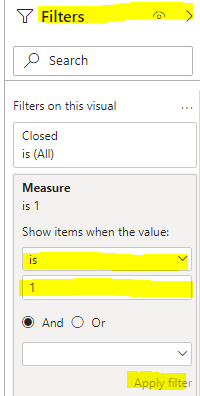
3. Place the measure in the Filter and select Apply Filter.

v-yangliu-msft_0-1617602834763.png

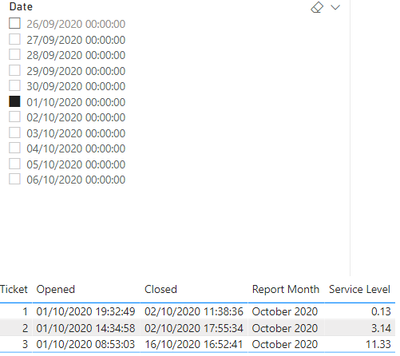
4. Result:

v-yangliu-msft_1-1617602834766.png

Regarding the Service Level formula, because of the Excel statement you used, can you explain the specific logic, so that it is better for me to help you:


You can downloaded PBIX file from here.


Best Regards,

Liu Yang

If this post helps, then please consider Accept it as the solution to help the other members find it more quickly.

Helpful resources

Announcements
Power BI DataViz World Championships

Power BI Dataviz World Championships

The Power BI Data Visualization World Championships is back! Get ahead of the game and start preparing now!

December 2025 Power BI Update Carousel

Power BI Monthly Update - December 2025

Check out the December 2025 Power BI Holiday Recap!

FabCon Atlanta 2026 carousel

FabCon Atlanta 2026

Join us at FabCon Atlanta, March 16-20, for the ultimate Fabric, Power BI, AI and SQL community-led event. Save $200 with code FABCOMM.