We've captured the moments from FabCon & SQLCon that everyone is talking about, and we are bringing them to the community, live and on-demand. Starts on April 14th. Register now
I need to create a bunch of Service Level KPIs. They will need to incorporate filters like status and type but what they all have in common is that the Report Month needs to match the slicer setting on the page (which takes care of one date filter aspect) BUT additionally a filter regarding the Open date and/or the Close date.
For example the correct count for October items would be Report Month shows Oct/2020 but ALSO Opened >= selected report period AND < report period+1day.
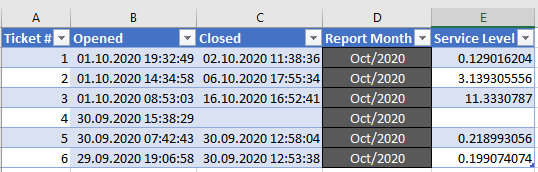
This currently works in Excel along these lines:
=IF(C2<>"",IF(INT(B2)=INT(C2),C2-B2,((C2-B2)*24-((1+INT(C2)-INT(B2))-NETWORKDAYS(B2,C2))*24+IF(NETWORKDAYS(B2,B2)=0,HOUR(B2)-8,0)-IF(AND(NETWORKDAYS(B2,B2)=1,HOUR(B2)<8), 8-HOUR(B2),0)-IF(AND(NETWORKDAYS(B2,B2)=1,HOUR(B2)>15), 32-HOUR(B2),0))/24),"")
Hi @PBI_Curious ,
Here are the steps you can follow:
1. Create a calendar
Date = CALENDARAUTO()
2. Create measure.
Measure =
var _select=SELECTEDVALUE('Date'[Date])
return
IF(_select=MAX('Table1'[Report Month])&&MAX('Table1'[Opened])>=_select&&MAX('Table1'[Opened])<=_select+1,1,0)
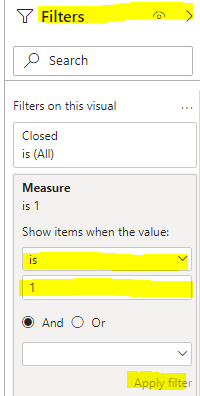
3. Place the measure in the Filter and select Apply Filter.
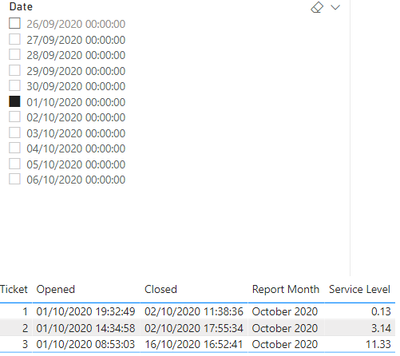
4. Result:
Regarding the Service Level formula, because of the Excel statement you used, can you explain the specific logic, so that it is better for me to help you:
You can downloaded PBIX file from here.
Best Regards,
Liu Yang
If this post helps, then please consider Accept it as the solution to help the other members find it more quickly.
If you have recently started exploring Fabric, we'd love to hear how it's going. Your feedback can help with product improvements.
A new Power BI DataViz World Championship is coming this June! Don't miss out on submitting your entry.
Share feedback directly with Fabric product managers, participate in targeted research studies and influence the Fabric roadmap.
| User | Count |
|---|---|
| 53 | |
| 38 | |
| 33 | |
| 17 | |
| 17 |
| User | Count |
|---|---|
| 67 | |
| 62 | |
| 38 | |
| 34 | |
| 22 |