cancel
Showing results for 
Search instead for 
Did you mean: 

We've captured the moments from FabCon & SQLCon that everyone is talking about, and we are bringing them to the community, live and on-demand. Starts on April 14th. Register now

Reply
Rapture101
New Member

Separating Values by comma

Hello All!

I seem to be getting stumped and cannot find an article or video about sepearating duplicate values

Orginal table:

Owned by | Business service | Description | User Type | User

IT              |  AVS                    |     Used by IT   | Affected user |  Mandy, bobbill

IT              |  AVS                    |     Used by IT   | Owner |  Mandy, bill

IT              |  AVS                    |     Used by IT   | Business Owner |  Mandy, bob

IT              |  AVS                    |     Used by IT   | Affected user |  Bill, Bob

IT              |  AVS                    |     Used by IT   | Affected user |  Bob, Bill


The above is the table listing a few duplicate values


I then pivot the table try max or don't aggregate ect, but then my table shaves off the other users ex:

Owned by | Business service | Description | Affected user | Owner | Business Owner

IT              |  AVS                    |     Used by IT   | Mandy, bobbill | Mandy, bill |  Mandy, bob


Expected result that I am trying to accomplish:

Owned by | Business service | Description | Affected user | Owner | Business Owner

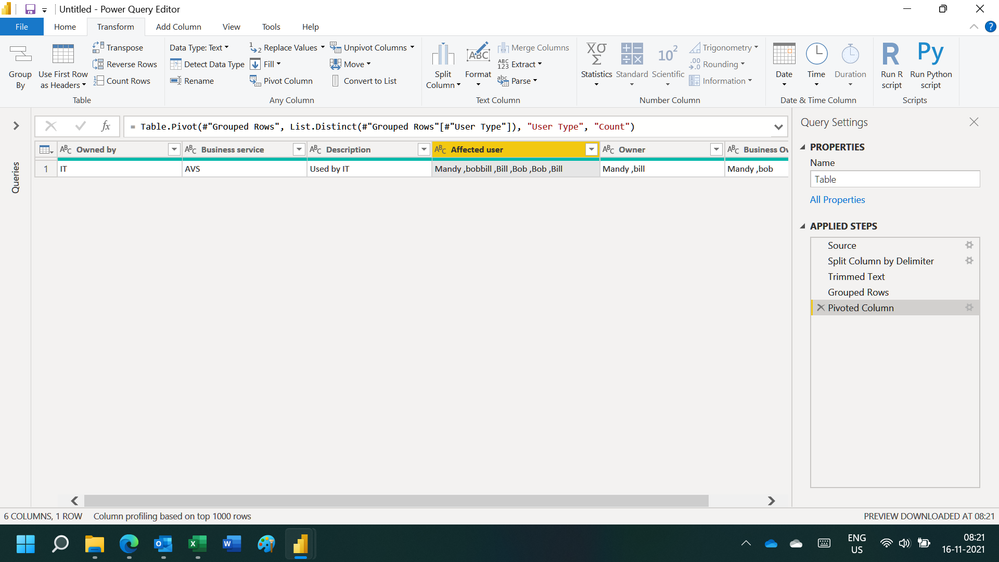
IT              |  AVS                    |     Used by IT   | Mandy, bobbill, Bill, Bob, Bob, Bill | Mandy, bill |  Mandy, bob


What I tried: I tried keep duplicates, I tried different pivot methods, I tried grouping but none seem to give me the ability to put a comma in between names of people and keep the data.


My question: Is this possible in power bi? I know I can perform this in ssrs: report builder. 


Thank you and please let me know if I can provide more data or info!


1 ACCEPTED SOLUTION
ryan_mayu
Super User
Super User

@Rapture101 

you can do this in PQ. pls see the attachment below.


Did I answer your question? Mark my post as a solution!

Proud to be a Super User!


View solution in original post

6 REPLIES 6
Ashish_Mathur
Super User
Super User

Hi,

You may download my PBI file from here.

Hope this helps.

Untitled.png


Regards,
Ashish Mathur
http://www.ashishmathur.com
https://www.linkedin.com/in/excelenthusiasts/

Hi! Unfortunately, I cannot download the sample file.

Hi,

It is available below my signature.


Regards,
Ashish Mathur
http://www.ashishmathur.com
https://www.linkedin.com/in/excelenthusiasts/
ryan_mayu
Super User
Super User

@Rapture101 

you can do this in PQ. pls see the attachment below.


Did I answer your question? Mark my post as a solution!

Proud to be a Super User!


This did it! Thank you!

you are welcome


Did I answer your question? Mark my post as a solution!

Proud to be a Super User!


Helpful resources

Announcements
New to Fabric survey Carousel

New to Fabric Survey

If you have recently started exploring Fabric, we'd love to hear how it's going. Your feedback can help with product improvements.

Power BI DataViz World Championships carousel

Power BI DataViz World Championships - June 2026

A new Power BI DataViz World Championship is coming this June! Don't miss out on submitting your entry.

Join our Fabric User Panel

Join our Fabric User Panel

Share feedback directly with Fabric product managers, participate in targeted research studies and influence the Fabric roadmap.

March Power BI Update Carousel

Power BI Community Update - March 2026

Check out the March 2026 Power BI update to learn about new features.