cancel
Showing results for 
Search instead for 
Did you mean: 

July 7 - July 17 | Round 2 of the Power BI Dataviz World Championships. Don't miss your chance! Learn more

Reply
Rapture101
New Member

Separating Values by comma

Hello All!

I seem to be getting stumped and cannot find an article or video about sepearating duplicate values

Orginal table:

Owned by | Business service | Description | User Type | User

IT              |  AVS                    |     Used by IT   | Affected user |  Mandy, bobbill

IT              |  AVS                    |     Used by IT   | Owner |  Mandy, bill

IT              |  AVS                    |     Used by IT   | Business Owner |  Mandy, bob

IT              |  AVS                    |     Used by IT   | Affected user |  Bill, Bob

IT              |  AVS                    |     Used by IT   | Affected user |  Bob, Bill


The above is the table listing a few duplicate values


I then pivot the table try max or don't aggregate ect, but then my table shaves off the other users ex:

Owned by | Business service | Description | Affected user | Owner | Business Owner

IT              |  AVS                    |     Used by IT   | Mandy, bobbill | Mandy, bill |  Mandy, bob


Expected result that I am trying to accomplish:

Owned by | Business service | Description | Affected user | Owner | Business Owner

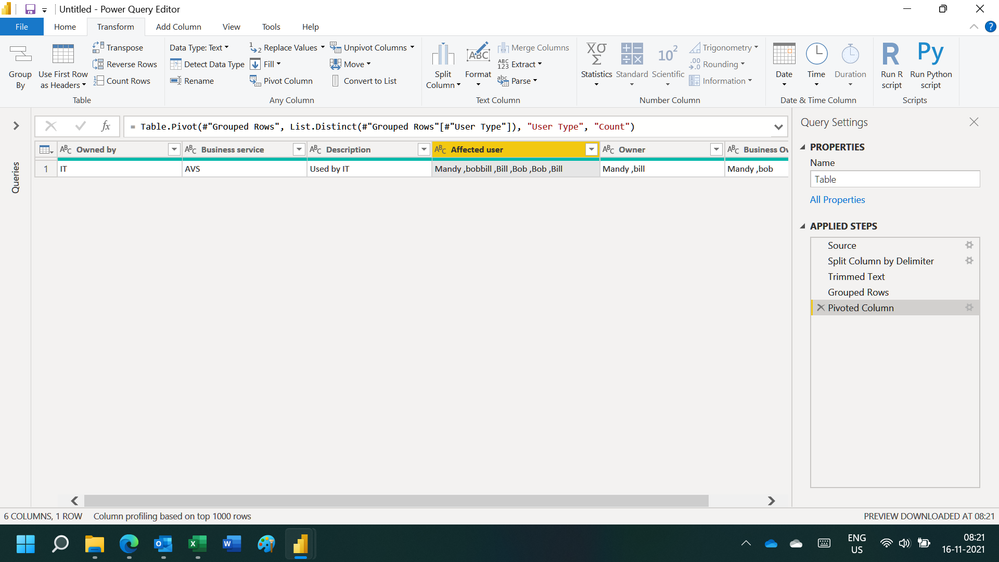
IT              |  AVS                    |     Used by IT   | Mandy, bobbill, Bill, Bob, Bob, Bill | Mandy, bill |  Mandy, bob


What I tried: I tried keep duplicates, I tried different pivot methods, I tried grouping but none seem to give me the ability to put a comma in between names of people and keep the data.


My question: Is this possible in power bi? I know I can perform this in ssrs: report builder. 


Thank you and please let me know if I can provide more data or info!


1 ACCEPTED SOLUTION
ryan_mayu
Super User
Super User

@Rapture101 

you can do this in PQ. pls see the attachment below.


Did I answer your question? Mark my post as a solution!

Proud to be a Super User!


View solution in original post

6 REPLIES 6
Ashish_Mathur
Super User
Super User

Hi,

You may download my PBI file from here.

Hope this helps.

Untitled.png


Regards,
Ashish Mathur
http://www.ashishmathur.com
https://www.linkedin.com/in/excelenthusiasts/

Hi! Unfortunately, I cannot download the sample file.

Hi,

It is available below my signature.


Regards,
Ashish Mathur
http://www.ashishmathur.com
https://www.linkedin.com/in/excelenthusiasts/
ryan_mayu
Super User
Super User

@Rapture101 

you can do this in PQ. pls see the attachment below.


Did I answer your question? Mark my post as a solution!

Proud to be a Super User!


This did it! Thank you!

you are welcome


Did I answer your question? Mark my post as a solution!

Proud to be a Super User!


Helpful resources

Announcements
FabCon and SQLCon Barcelona 2026

FabCon & SQLCon – Barcelona 2026

Join us in Barcelona for FabCon and SQLCon, the Fabric, Power BI, SQL, and AI community event. Save €200 with code FABCMTY200.

60 days of Data Days Carousel

Data Days 2026

Join Fabric Data Days 2026: 60 days of free live/on-demand sessions, challenges, study groups, and certification opportunities.

Power BI DataViz World Championships carousel

Power BI DataViz World Championships - June 2026

A new Power BI DataViz World Championship is coming this June! Don't miss out on submitting your entry.