Join us in Barcelona for FabCon and SQLCon, September 28 - October 1, 2026.
This is best Fabric, Power BI, SQL and AI community event. How do we know? The last event sold out! Save €200 with code FABCMTY200.
Register now- Power BI forums
- Get Help with Power BI
- Desktop
- Service
- Report Server
- Power Query
- Mobile Apps
- Developer
- DAX Commands and Tips
- Custom Visuals Development Discussion
- Health and Life Sciences
- Power BI Spanish forums
- Translated Spanish Desktop
- Training and Consulting
- Instructor Led Training
- Dashboard in a Day for Women, by Women
- Galleries
- Data Stories Gallery
- Themes Gallery
- Contests Gallery
- QuickViz Gallery
- Quick Measures Gallery
- Visual Calculations Gallery
- Fabric Apps Gallery
- Notebook Gallery
- Translytical Task Flow Gallery
- TMDL Gallery
- R Script Showcase
- Webinars and Video Gallery
- Ideas
- Custom Visuals Ideas (read-only)
- Issues
- Issues
- Events
- Upcoming Events
The Fabric community is now in read-only for platform upgrade. Learn more
- Power BI forums
- Forums
- Get Help with Power BI
- Desktop
- Re: Selecting Rows based off Column Text
- Subscribe to RSS Feed
- Mark Topic as New
- Mark Topic as Read
- Float this Topic for Current User
- Bookmark
- Subscribe
- Printer Friendly Page


- Mark as New
- Bookmark
- Subscribe
- Mute
- Subscribe to RSS Feed
- Permalink
Selecting Rows based off Column Text
Hello-
I'm looking for help in creating a Measure that looks at each row in a period and if there is more than 1 source (Ex: EFP & CRM) it defaults to EFP. But if there is only 1 source (CRM or EFP or TBD) it looks at that row. I need the formula to decide this by GL period.
In 21-Jan, data was entered from CRM and EFP, we just want the line from EFP.
In 21-Feb, there's just data from CRM so we would want that row
In 21-May, there is data from CRM and EFP, we want the EFP line
| Project Name | GL Period | Source (TBD/EFP/CRM) | Data Source |
| Solar Power | 21-Jan | CRM | Board |
| Solar Power | 21-Jan | CRM | Board |
| Solar Power | 21-Jan | EFP | Board |
| Solar Power | 21-Feb | CRM | Board |
| Solar Power | 21-May | CRM | Board |
| Solar Power | 21-May | EFP | Board |
| Solar Power | 21-Jun | EFP | Board |
Solved! Go to Solution.


- Mark as New
- Bookmark
- Subscribe
- Mute
- Subscribe to RSS Feed
- Permalink
HI @Jdokken ,
Yes ,you could use "Use" and "Don't use".See the below:
Measure =
VAR test1 =
    CALCULATE (
        MAX ( 'Table'[mark] ),
        FILTER ( ALL ( 'Table' ), 'Table'[GL Period] = MAX ( 'Table'[GL Period] ) )
    )
VAR test2 =
    IF ( test1 = 1, "USE", "Don't use")
RETURN
    test2
multiple in sources in a period I want it to always default to EFP: the below data:2021/1/21 with three source ,one EFP and two CRM,due to it with EFP,it only get "USE".

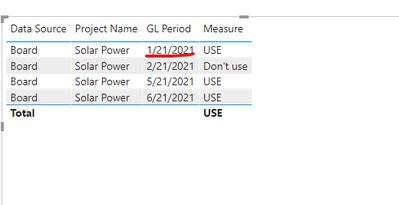
And also ,if you want to create a new column get want you want instead of measure,use the below:
back =
VAR test1 =
    CALCULATE (
        MAX ( 'Table'[mark] ),ALLEXCEPT('Table','Table'[GL Period]))
RETURN
    IF(test1=1,"USE","Don't use")
Final you will get :

Wish it is helpful for you!
Best Rergards
Lucien
- Mark as New
- Bookmark
- Subscribe
- Mute
- Subscribe to RSS Feed
- Permalink
Hi @Jdokken ,
Pls change measure to the below:
Measure =
var test3= CALCULATE (
        sum ( 'Table'[mark] ),
        FILTER ( ALL ( 'Table' ), 'Table'[GL Period] = MAX ( 'Table'[GL Period] ) )
    )    VAR test2 =
    IF ( MAX('Table'[mark]) = 1||test3=0, "USE", "Don't use")
RETURN
    test2
Final get:
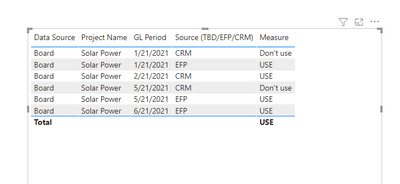
Best Regards
Lucien
- Mark as New
- Bookmark
- Subscribe
- Mute
- Subscribe to RSS Feed
- Permalink
HI @Jdokken ,
Yes ,you could use "Use" and "Don't use".See the below:
Measure =
VAR test1 =
    CALCULATE (
        MAX ( 'Table'[mark] ),
        FILTER ( ALL ( 'Table' ), 'Table'[GL Period] = MAX ( 'Table'[GL Period] ) )
    )
VAR test2 =
    IF ( test1 = 1, "USE", "Don't use")
RETURN
    test2
multiple in sources in a period I want it to always default to EFP: the below data:2021/1/21 with three source ,one EFP and two CRM,due to it with EFP,it only get "USE".
And also ,if you want to create a new column get want you want instead of measure,use the below:
back =
VAR test1 =
    CALCULATE (
        MAX ( 'Table'[mark] ),ALLEXCEPT('Table','Table'[GL Period]))
RETURN
    IF(test1=1,"USE","Don't use")
Final you will get :
Wish it is helpful for you!
Best Rergards
Lucien
- Mark as New
- Bookmark
- Subscribe
- Mute
- Subscribe to RSS Feed
- Permalink
Hello-
Thanks for your response. In the second picture you sent with the column labled "back" I would actually want it to read:
1/21/2021: CRM Don't use
1/21/2021: CRM Don't use
1/21/2021: EFP Use
2/21/2021: CRM Use
5/21/2021: CRM Don't Use
5/21/2021: EFP Use
6/21/2021: EFP Use
- Mark as New
- Bookmark
- Subscribe
- Mute
- Subscribe to RSS Feed
- Permalink
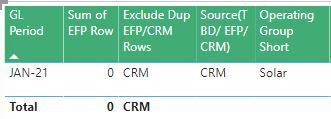
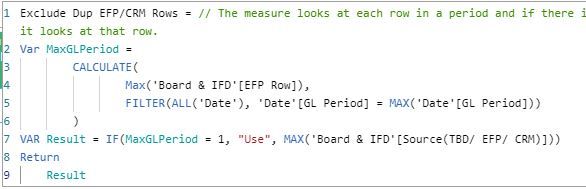
@v-luwang-msft Thanks so much for your reply! So instead of the end result bringing back CRM if it's 0 and EFP if it's 1, can we do "Use" "Don't use" or something like that so I can use it as a filter in another measure? Right now it's just bringing back the same thing that's in the Source (EFP/TBD/CRM) field. So for example, in this picture it's bringing back CRM because it's the only row for this period. I'd want it to say "Use" because 0 is the max in that period. But if there are multiple in sources in a period I want it to always default to EFP.

- Mark as New
- Bookmark
- Subscribe
- Mute
- Subscribe to RSS Feed
- Permalink
Hi @Jdokken ,
Try the following steps:
step1,create a new column by the following dax:
IF(MAX('Table'[Source (TBD/EFP/CRM)])="EFP",1,0)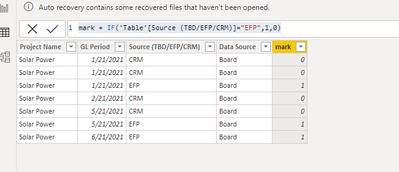
Step 2, create the following measure:
Measure =
VAR test1 =
    CALCULATE (
        MAX ( 'Table'[mark] ),
        FILTER ( ALL ( 'Table' ), 'Table'[GL Period] = MAX ( 'Table'[GL Period] ) )
    )
VAR test2 =
    IF ( test1 = 1, "EFP", MAX ( 'Table'[Source (TBD/EFP/CRM)] ) )
RETURN
    test2
And final you will get the below:
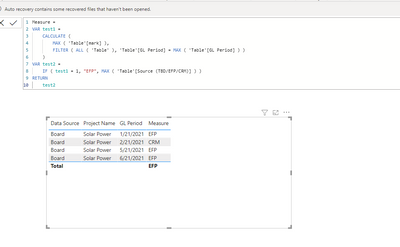
Wish it is helpful for you!
Best Regards
Lucien

Helpful resources

FabCon & SQLCon – Barcelona 2026
Join us in Barcelona for FabCon and SQLCon, the Fabric, Power BI, SQL, and AI community event. Save €200 with code FABCMTY200.

Power BI DataViz World Championships - June 2026
A new Power BI DataViz World Championship is coming this June! Don't miss out on submitting your entry.

| User | Count |
|---|---|
| 23 | |
| 22 | |
| 14 | |
| 14 | |
| 13 |


| User | Count |
|---|---|
| 47 | |
| 39 | |
| 24 | |
| 20 | |
| 20 |


