
cancel
Showing results for 
Search instead for 
Did you mean: 

The Power BI Data Visualization World Championships is back! It's time to submit your entry. Live now!

Reply
Jdokken
Helper III
Helper III

Selecting Rows based off Column Text

Hello- 

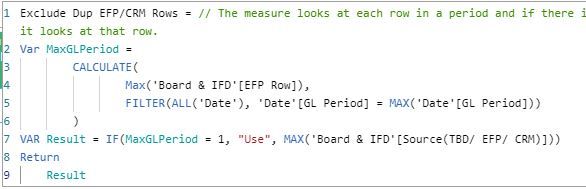
I'm looking for help in creating a Measure that looks at each row in a period and if there is more than 1 source (Ex: EFP & CRM) it defaults to EFP. But if there is only 1 source (CRM or EFP or TBD) it looks at that row. I need the formula to decide this by GL period. 

In 21-Jan, data was entered from CRM and EFP, we just want the line from EFP.

In 21-Feb, there's just data from CRM so we would want that row

In 21-May, there is data from CRM and EFP, we want the EFP line

Project NameGL PeriodSource (TBD/EFP/CRM)Data Source
Solar Power21-JanCRMBoard
Solar Power21-JanEFPBoard
Solar Power21-FebCRMBoard
Solar Power21-MayCRMBoard
Solar Power21-MayEFPBoard
Solar Power21-JunEFPBoard
1 ACCEPTED SOLUTION
v-luwang-msft
Community Support
Community Support

HI @Jdokken ,

Yes ,you could use "Use"  and "Don't use".See the below:

Measure = 
VAR test1 =
    CALCULATE (
        MAX ( 'Table'[mark] ),
        FILTER ( ALL ( 'Table' ), 'Table'[GL Period] = MAX ( 'Table'[GL Period] ) )
    )
VAR test2 =
    IF ( test1 = 1, "USE", "Don't use") 
RETURN
    test2


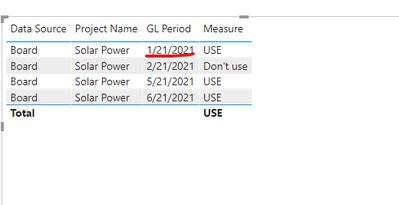
multiple in sources in a period I want it to always default to EFP: the below data:2021/1/21 with three source ,one EFP and two CRM,due to it with EFP,it only get "USE".

vluwangmsft_0-1624415853987.png

vluwangmsft_1-1624416024236.png

And also ,if you want to create a new column get want you want  instead of measure,use the below:

back = 
VAR test1 =
    CALCULATE (
        MAX ( 'Table'[mark] ),ALLEXCEPT('Table','Table'[GL Period]))
RETURN
    IF(test1=1,"USE","Don't use")

Final you will get :

vluwangmsft_2-1624416621514.png


Wish it is helpful for you!


Best Rergards

Lucien

View solution in original post

5 REPLIES 5
v-luwang-msft
Community Support
Community Support

Hi @Jdokken ,

Pls change measure to the below:

Measure = 
var test3= CALCULATE (
        sum ( 'Table'[mark] ),
        FILTER ( ALL ( 'Table' ), 'Table'[GL Period] = MAX ( 'Table'[GL Period] ) )
    )    VAR test2 =
    IF ( MAX('Table'[mark]) = 1||test3=0, "USE", "Don't use")   
RETURN  
    test2

Final get:

vluwangmsft_0-1625103873071.png


Best Regards

Lucien

v-luwang-msft
Community Support
Community Support

HI @Jdokken ,

Yes ,you could use "Use"  and "Don't use".See the below:

Measure = 
VAR test1 =
    CALCULATE (
        MAX ( 'Table'[mark] ),
        FILTER ( ALL ( 'Table' ), 'Table'[GL Period] = MAX ( 'Table'[GL Period] ) )
    )
VAR test2 =
    IF ( test1 = 1, "USE", "Don't use") 
RETURN
    test2


multiple in sources in a period I want it to always default to EFP: the below data:2021/1/21 with three source ,one EFP and two CRM,due to it with EFP,it only get "USE".

vluwangmsft_0-1624415853987.png

vluwangmsft_1-1624416024236.png

And also ,if you want to create a new column get want you want  instead of measure,use the below:

back = 
VAR test1 =
    CALCULATE (
        MAX ( 'Table'[mark] ),ALLEXCEPT('Table','Table'[GL Period]))
RETURN
    IF(test1=1,"USE","Don't use")

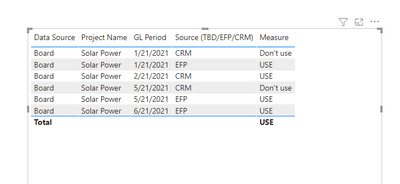
Final you will get :

vluwangmsft_2-1624416621514.png


Wish it is helpful for you!


Best Rergards

Lucien

Hello- 

Thanks for your response. In the second picture you sent with the column labled "back" I would actually want it to read:

1/21/2021: CRM   Don't use

1/21/2021: CRM   Don't use

1/21/2021: EFP     Use

2/21/2021: CRM   Use

5/21/2021: CRM   Don't Use

5/21/2021: EFP     Use 

6/21/2021: EFP      Use  

Jdokken
Helper III
Helper III

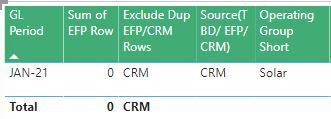
@v-luwang-msft Thanks so much for your reply! So instead of the end result bringing back CRM if it's 0 and EFP if it's 1, can we do "Use" "Don't use" or something like that so I can use it as a filter in another measure?  Right now it's just bringing back the same thing that's in the Source (EFP/TBD/CRM) field.  So for example, in this picture it's bringing back CRM because it's the only row for this period. I'd want it to say "Use" because 0 is the max in that period. But if there are multiple in sources in a period I want it to always default to EFP. 


EFP Row 3.JPGEFP Row 2.JPGEFP Row Image.JPG

v-luwang-msft
Community Support
Community Support

Hi @Jdokken ,

Try the following steps:

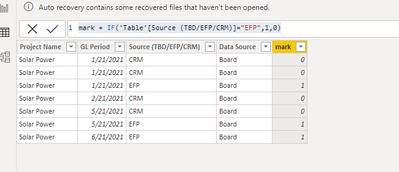
step1,create a new column by the following dax:

IF(MAX('Table'[Source (TBD/EFP/CRM)])="EFP",1,0)

vluwangmsft_0-1623913552628.png


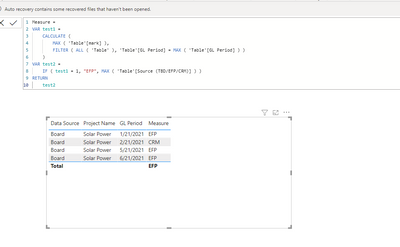
Step 2, create the following measure:

Measure =
VAR test1 =
    CALCULATE (
        MAX ( 'Table'[mark] ),
        FILTER ( ALL ( 'Table' ), 'Table'[GL Period] = MAX ( 'Table'[GL Period] ) )
    )
VAR test2 =
    IF ( test1 = 1, "EFP", MAX ( 'Table'[Source (TBD/EFP/CRM)] ) )
RETURN
    test2

And final you will get the below:

vluwangmsft_1-1623913660527.png


Wish it is helpful for you!


Best Regards

Lucien

Helpful resources

Announcements
December 2025 Power BI Update Carousel

Power BI Monthly Update - December 2025

Check out the December 2025 Power BI Holiday Recap!

FabCon Atlanta 2026 carousel

FabCon Atlanta 2026

Join us at FabCon Atlanta, March 16-20, for the ultimate Fabric, Power BI, AI and SQL community-led event. Save $200 with code FABCOMM.