This time we’re going bigger than ever. Fabric, Power BI, SQL, AI and more. We're covering it all. You won't want to miss it.
Learn moreDid you hear? There's a new SQL AI Developer certification (DP-800). Start preparing now and be one of the first to get certified. Register now
Hello all,
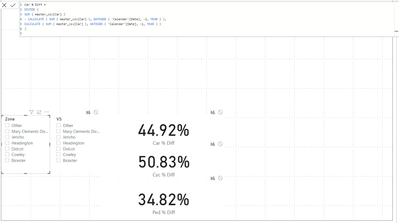
I have a percentage difference volume measure for - 1 year.
my dataset contains a number of locations also. how would i go about finding the difference between the two.
Solved! Go to Solution.
Hey @phyconia ,
how do you want to analyze?
If you want one card to only return the value for the Zone-Slicer, then use a card and change the interaction with the second visual and do the same for the VS-Slicer and the second card:
Change how visuals interact in a report - Power BI | Microsoft Docs
If you want to get a result in a measure then calculate the value for the first slicer, use ALL(mySlicerTable[VS]) to remove the filter from the second slicer and then divide by the measure of the second slicer and use ALL(mySlicerTable[Zone]).
Hey @phyconia ,
then you can do everything in one measure, like I proposed in the second appraoch.
Something like this should do it:
Percentage =
VAR vMeasure1 = CALCULATE( [result of % car diff from Zone], ALL( slicerTable[VS] ) )
VAR vMeasure2 = CALCULATE( [result of % car diff from VS], ALL( slicerTable[Zone] ) )
RETURN
DIVIDE(
vMeasure1,
vMeasure2
)
Hey @phyconia ,
how do you want to analyze?
If you want one card to only return the value for the Zone-Slicer, then use a card and change the interaction with the second visual and do the same for the VS-Slicer and the second card:
Change how visuals interact in a report - Power BI | Microsoft Docs
If you want to get a result in a measure then calculate the value for the first slicer, use ALL(mySlicerTable[VS]) to remove the filter from the second slicer and then divide by the measure of the second slicer and use ALL(mySlicerTable[Zone]).
Im sorry, I didn't make it easy to understand to be honest.
What i want to do is get the result of % car diff from Zone and the result of % car diff from VS and get the percentage difference between the 2 as a new measure shown in a single card.
Hey @phyconia ,
then you can do everything in one measure, like I proposed in the second appraoch.
Something like this should do it:
Percentage =
VAR vMeasure1 = CALCULATE( [result of % car diff from Zone], ALL( slicerTable[VS] ) )
VAR vMeasure2 = CALCULATE( [result of % car diff from VS], ALL( slicerTable[Zone] ) )
RETURN
DIVIDE(
vMeasure1,
vMeasure2
)
Check out the April 2026 Power BI update to learn about new features.
Sign up to receive a private message when registration opens and key events begin.
If you have recently started exploring Fabric, we'd love to hear how it's going. Your feedback can help with product improvements.
| User | Count |
|---|---|
| 35 | |
| 32 | |
| 27 | |
| 23 | |
| 16 |
| User | Count |
|---|---|
| 65 | |
| 50 | |
| 30 | |
| 25 | |
| 24 |