cancel
Showing results for 
Search instead for 
Did you mean: 

Data Days is here! Join us now for 60+ days of learning, challenges, and connection. Learn more

Reply
phyconia
Frequent Visitor

Selectable % Difference between variables

Hello all,

phyconia_0-1622111199656.png


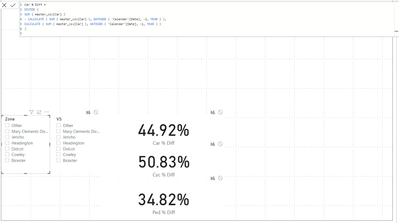
I have a percentage difference volume  measure for - 1 year.

my dataset contains a number of locations also. how would i go about finding the difference between the two.


2 ACCEPTED SOLUTIONS
selimovd
Most Valuable Professional

Hey @phyconia ,


how do you want to analyze?

If you want one card to only return the value for the Zone-Slicer, then use a card and change the interaction with the second visual and do the same for the VS-Slicer and the second card:

Change how visuals interact in a report - Power BI | Microsoft Docs


If you want to get a result in a measure then calculate the value for the first slicer, use ALL(mySlicerTable[VS]) to remove the filter from the second slicer and then divide by the measure of the second slicer and use ALL(mySlicerTable[Zone]).


If you need any help please let me know.
If I answered your question I would be happy if you could mark my post as a solution ✔️ and give it a thumbs up 👍
 
Best regards
Denis
 

View solution in original post

selimovd
Most Valuable Professional

Hey @phyconia ,


then you can do everything in one measure, like I proposed in the second appraoch.

Something like this should do it:

Percentage =
VAR vMeasure1 = CALCULATE( [result of % car diff from Zone], ALL( slicerTable[VS] ) )
VAR vMeasure2 = CALCULATE( [result of % car diff from VS], ALL( slicerTable[Zone] ) )
RETURN
    DIVIDE(
        vMeasure1,
        vMeasure2
    )


If you need any help please let me know.
If I answered your question I would be happy if you could mark my post as a solution ✔️ and give it a thumbs up 👍
 
Best regards
Denis
 

View solution in original post

3 REPLIES 3
selimovd
Most Valuable Professional

Hey @phyconia ,


how do you want to analyze?

If you want one card to only return the value for the Zone-Slicer, then use a card and change the interaction with the second visual and do the same for the VS-Slicer and the second card:

Change how visuals interact in a report - Power BI | Microsoft Docs


If you want to get a result in a measure then calculate the value for the first slicer, use ALL(mySlicerTable[VS]) to remove the filter from the second slicer and then divide by the measure of the second slicer and use ALL(mySlicerTable[Zone]).


If you need any help please let me know.
If I answered your question I would be happy if you could mark my post as a solution ✔️ and give it a thumbs up 👍
 
Best regards
Denis
 

Im sorry, I didn't make it easy to understand to be honest.


What i want to do is get the result of % car diff from Zone and the result of % car diff from VS and get the percentage difference between the 2 as a new measure shown in a single card. 

selimovd
Most Valuable Professional

Hey @phyconia ,


then you can do everything in one measure, like I proposed in the second appraoch.

Something like this should do it:

Percentage =
VAR vMeasure1 = CALCULATE( [result of % car diff from Zone], ALL( slicerTable[VS] ) )
VAR vMeasure2 = CALCULATE( [result of % car diff from VS], ALL( slicerTable[Zone] ) )
RETURN
    DIVIDE(
        vMeasure1,
        vMeasure2
    )


If you need any help please let me know.
If I answered your question I would be happy if you could mark my post as a solution ✔️ and give it a thumbs up 👍
 
Best regards
Denis
 

Helpful resources

Announcements
Fabric Data Days is here Carousel

Fabric Data Days 2026

Don't miss out on Data Days, June 15 through August 7. Learn Fabric, Power BI, SQL, AI and more.

May Power BI Update Carousel

Power BI Monthly Update - May 2026

Check out the May 2026 Power BI update to learn about new features.

Power BI DataViz World Championships carousel

Power BI DataViz World Championships - June 2026

A new Power BI DataViz World Championship is coming this June! Don't miss out on submitting your entry.