cancel
Showing results for 
Search instead for 
Did you mean: 

July 7 - July 17 | Round 2 of the Power BI Dataviz World Championships. Don't miss your chance! Learn more

Reply
phyconia
Frequent Visitor

Selectable % Difference between variables

Hello all,

phyconia_0-1622111199656.png


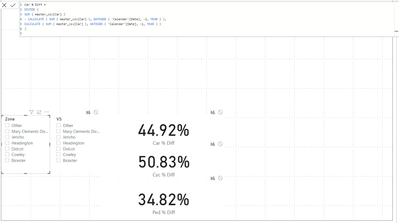
I have a percentage difference volume  measure for - 1 year.

my dataset contains a number of locations also. how would i go about finding the difference between the two.


2 ACCEPTED SOLUTIONS
selimovd
Most Valuable Professional

Hey @phyconia ,


how do you want to analyze?

If you want one card to only return the value for the Zone-Slicer, then use a card and change the interaction with the second visual and do the same for the VS-Slicer and the second card:

Change how visuals interact in a report - Power BI | Microsoft Docs


If you want to get a result in a measure then calculate the value for the first slicer, use ALL(mySlicerTable[VS]) to remove the filter from the second slicer and then divide by the measure of the second slicer and use ALL(mySlicerTable[Zone]).


If you need any help please let me know.
If I answered your question I would be happy if you could mark my post as a solution ✔️ and give it a thumbs up 👍
 
Best regards
Denis
 

View solution in original post

selimovd
Most Valuable Professional

Hey @phyconia ,


then you can do everything in one measure, like I proposed in the second appraoch.

Something like this should do it:

Percentage =
VAR vMeasure1 = CALCULATE( [result of % car diff from Zone], ALL( slicerTable[VS] ) )
VAR vMeasure2 = CALCULATE( [result of % car diff from VS], ALL( slicerTable[Zone] ) )
RETURN
    DIVIDE(
        vMeasure1,
        vMeasure2
    )


If you need any help please let me know.
If I answered your question I would be happy if you could mark my post as a solution ✔️ and give it a thumbs up 👍
 
Best regards
Denis
 

View solution in original post

3 REPLIES 3
selimovd
Most Valuable Professional

Hey @phyconia ,


how do you want to analyze?

If you want one card to only return the value for the Zone-Slicer, then use a card and change the interaction with the second visual and do the same for the VS-Slicer and the second card:

Change how visuals interact in a report - Power BI | Microsoft Docs


If you want to get a result in a measure then calculate the value for the first slicer, use ALL(mySlicerTable[VS]) to remove the filter from the second slicer and then divide by the measure of the second slicer and use ALL(mySlicerTable[Zone]).


If you need any help please let me know.
If I answered your question I would be happy if you could mark my post as a solution ✔️ and give it a thumbs up 👍
 
Best regards
Denis
 

Im sorry, I didn't make it easy to understand to be honest.


What i want to do is get the result of % car diff from Zone and the result of % car diff from VS and get the percentage difference between the 2 as a new measure shown in a single card. 

selimovd
Most Valuable Professional

Hey @phyconia ,


then you can do everything in one measure, like I proposed in the second appraoch.

Something like this should do it:

Percentage =
VAR vMeasure1 = CALCULATE( [result of % car diff from Zone], ALL( slicerTable[VS] ) )
VAR vMeasure2 = CALCULATE( [result of % car diff from VS], ALL( slicerTable[Zone] ) )
RETURN
    DIVIDE(
        vMeasure1,
        vMeasure2
    )


If you need any help please let me know.
If I answered your question I would be happy if you could mark my post as a solution ✔️ and give it a thumbs up 👍
 
Best regards
Denis
 

Helpful resources

Announcements
FabCon and SQLCon Barcelona 2026

FabCon & SQLCon – Barcelona 2026

Join us in Barcelona for FabCon and SQLCon, the Fabric, Power BI, SQL, and AI community event. Save €200 with code FABCMTY200.

60 days of Data Days Carousel

Data Days 2026

Join Fabric Data Days 2026: 60 days of free live/on-demand sessions, challenges, study groups, and certification opportunities.

Power BI DataViz World Championships carousel

Power BI DataViz World Championships - June 2026

A new Power BI DataViz World Championship is coming this June! Don't miss out on submitting your entry.