FabCon is coming to Atlanta
Join us at FabCon Atlanta from March 16 - 20, 2026, for the ultimate Fabric, Power BI, AI and SQL community-led event. Save $200 with code FABCOMM.
Register now!- Power BI forums
- Get Help with Power BI
- Desktop
- Service
- Report Server
- Power Query
- Mobile Apps
- Developer
- DAX Commands and Tips
- Custom Visuals Development Discussion
- Health and Life Sciences
- Power BI Spanish forums
- Translated Spanish Desktop
- Training and Consulting
- Instructor Led Training
- Dashboard in a Day for Women, by Women
- Galleries
- Data Stories Gallery
- Themes Gallery
- Contests Gallery
- QuickViz Gallery
- Quick Measures Gallery
- Visual Calculations Gallery
- Notebook Gallery
- Translytical Task Flow Gallery
- TMDL Gallery
- R Script Showcase
- Webinars and Video Gallery
- Ideas
- Custom Visuals Ideas (read-only)
- Issues
- Issues
- Events
- Upcoming Events
The Power BI Data Visualization World Championships is back! Get ahead of the game and start preparing now! Learn more
- Power BI forums
- Forums
- Get Help with Power BI
- Desktop
- Re: Select most recent row for each item
- Subscribe to RSS Feed
- Mark Topic as New
- Mark Topic as Read
- Float this Topic for Current User
- Bookmark
- Subscribe
- Printer Friendly Page
- Mark as New
- Bookmark
- Subscribe
- Mute
- Subscribe to RSS Feed
- Permalink
- Report Inappropriate Content
Select most recent row for each item
I have a Table which is created though a UNION of some queries.
The table has many rows for each widget that I care about -- basically one row for every day.
So it looks somewhat like this:
| Widget Id | Date | Data2 | Data2 |
| A | 3/4/2021 | blah1 | blahA |
| B | 3/4/2021 | blah2 | blahB |
| A | 3/5/2021 | blah3 | blahC |
| B | 3/5/2021 | blah4 | blahD |
| A | 3/6/2021 | blah5 | blahE |
| B | 3/6/2021 | blah6 | blahF |
| C | 3/6/2021 | blah7 | blahG |
| A | 3/7/2021 | blah8 | blah |
| C | 3/7/2021 | blah10 | blah |
What I am trying to do is select only the rows from the latest data into visuals, so all I want is:
| Widget Id | Date | Data2 | Data2 |
| A | 3/7/2021 | blah8 | blah |
| B | 3/6/2021 | blah9 | blah |
| C | 3/7/2021 | blah10 | blah |
ie: I want just the lastest row's data per widget
Help?
*EDIT: Not each widget will have data for every day, so above, WidgetB's data would be form the 6th, whereas A & C are from the 7th.
Solved! Go to Solution.


- Mark as New
- Bookmark
- Subscribe
- Mute
- Subscribe to RSS Feed
- Permalink
- Report Inappropriate Content
Hi @RuiPatricio
You can do this in DAX (1 below) or in the Query editor (2). See it all at work in the attached file.
1. Create a new calculated table
Table2 =
FILTER (
    Table1,
    Table1[Date]
        = CALCULATE ( MAX ( Table1[Date] ), ALLEXCEPT ( Table1, Table1[Widget Id] ) )
)
2. Place the following M code in a blank query to see the steps.
let
    Source = Table.FromRows(Json.Document(Binary.Decompress(Binary.FromText("ZY05DoAwDAT/4jpSDnJAGcLxiCgFVBT8vwaBQRulGks7GudMkQR10kqjjL7P/dyOj5GKyDS2gmGOj/AWHAodM0GhEixzgoJHwTFnKFSCZy6PkFohMFd4EVDomfCh2gfcU7tr9QvlAg==", BinaryEncoding.Base64), Compression.Deflate)), let _t = ((type nullable text) meta [Serialized.Text = true]) in type table [#"Widget Id" = _t, Date = _t, Data2 = _t, Data2_2 = _t]),
    #"Changed Type" = Table.TransformColumnTypes(Source,{{"Widget Id", type text}, {"Date", type date}, {"Data2", type text}}),

    #"Grouped Rows" = Table.Group(#"Changed Type", {"Widget Id"}, {{"Count", each Table.Max(_,"Date") }}),
    #"Expanded Count" = Table.ExpandRecordColumn(#"Grouped Rows", "Count", {"Date", "Data2", "Data2_2"}, {"Date", "Data2", "Data2_2"}),
    #"Changed Type1" = Table.TransformColumnTypes(#"Expanded Count",{{"Date", type date}, {"Data2", type text}, {"Data2_2", type text}})
in
    #"Changed Type1"
|
|
Please accept the solution when done and consider giving a thumbs up if posts are helpful. Contact me privately for support with any larger-scale BI needs, tutoring, etc. |


- Mark as New
- Bookmark
- Subscribe
- Mute
- Subscribe to RSS Feed
- Permalink
- Report Inappropriate Content
Hi @RuiPatricio ,
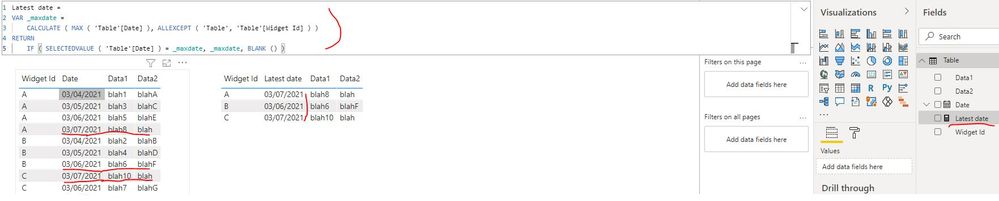
You can create a measure as below to get the latest date:
Latest date =
VAR _maxdate =
    CALCULATE ( MAX ( 'Table'[Date] ), ALLEXCEPT ( 'Table', 'Table'[Widget Id] ) )
RETURN
    IF ( SELECTEDVALUE ( 'Table'[Date] ) = _maxdate, _maxdate, BLANK () )


- Mark as New
- Bookmark
- Subscribe
- Mute
- Subscribe to RSS Feed
- Permalink
- Report Inappropriate Content
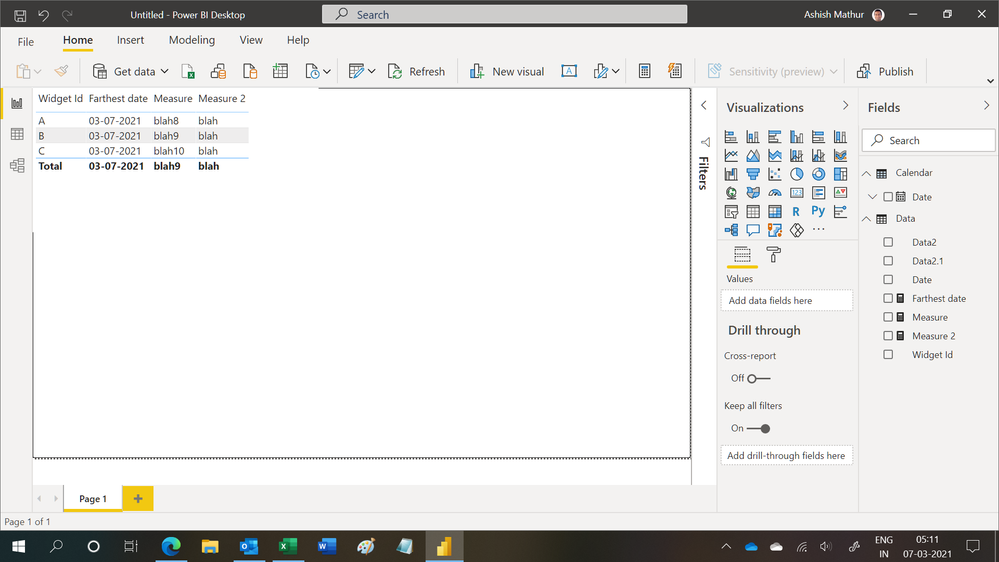
Hi,
You may download my PBI file from here.
Hope this helps.
Regards,
Ashish Mathur
http://www.ashishmathur.com
https://www.linkedin.com/in/excelenthusiasts/
- Mark as New
- Bookmark
- Subscribe
- Mute
- Subscribe to RSS Feed
- Permalink
- Report Inappropriate Content
thanks @Ashish_Mathur
I was not clear in my question (& I've edited my post).
Not every widget will have a row for the latest day; the data I'm looking for is the latest data for that particular widget
- Mark as New
- Bookmark
- Subscribe
- Mute
- Subscribe to RSS Feed
- Permalink
- Report Inappropriate Content
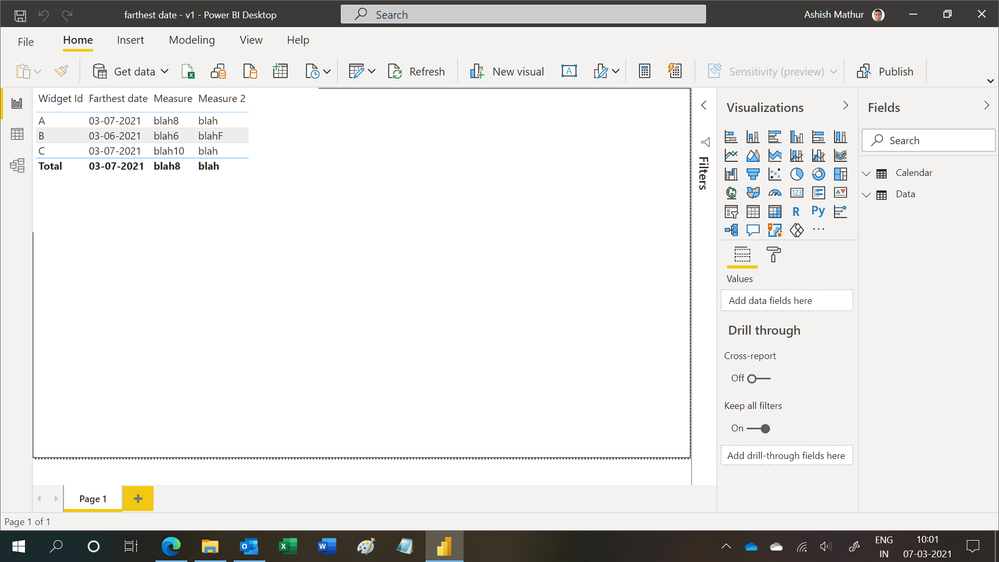
My solution still works. See the screenshot.
Regards,
Ashish Mathur
http://www.ashishmathur.com
https://www.linkedin.com/in/excelenthusiasts/
- Mark as New
- Bookmark
- Subscribe
- Mute
- Subscribe to RSS Feed
- Permalink
- Report Inappropriate Content
thanks @AlB
My UNION table has ~15mil rows / ~6mil widgets. Is one of these options more efficient than the other?
- Mark as New
- Bookmark
- Subscribe
- Mute
- Subscribe to RSS Feed
- Permalink
- Report Inappropriate Content
Most likely the PQ option is faster. Give both a try though. They're both simple to implement
|
|
Please accept the solution when done and consider giving a thumbs up if posts are helpful. Contact me privately for support with any larger-scale BI needs, tutoring, etc. |
- Mark as New
- Bookmark
- Subscribe
- Mute
- Subscribe to RSS Feed
- Permalink
- Report Inappropriate Content
Hi @RuiPatricio
You can do this in DAX (1 below) or in the Query editor (2). See it all at work in the attached file.
1. Create a new calculated table
Table2 =
FILTER (
    Table1,
    Table1[Date]
        = CALCULATE ( MAX ( Table1[Date] ), ALLEXCEPT ( Table1, Table1[Widget Id] ) )
)
2. Place the following M code in a blank query to see the steps.
let
    Source = Table.FromRows(Json.Document(Binary.Decompress(Binary.FromText("ZY05DoAwDAT/4jpSDnJAGcLxiCgFVBT8vwaBQRulGks7GudMkQR10kqjjL7P/dyOj5GKyDS2gmGOj/AWHAodM0GhEixzgoJHwTFnKFSCZy6PkFohMFd4EVDomfCh2gfcU7tr9QvlAg==", BinaryEncoding.Base64), Compression.Deflate)), let _t = ((type nullable text) meta [Serialized.Text = true]) in type table [#"Widget Id" = _t, Date = _t, Data2 = _t, Data2_2 = _t]),
    #"Changed Type" = Table.TransformColumnTypes(Source,{{"Widget Id", type text}, {"Date", type date}, {"Data2", type text}}),

    #"Grouped Rows" = Table.Group(#"Changed Type", {"Widget Id"}, {{"Count", each Table.Max(_,"Date") }}),
    #"Expanded Count" = Table.ExpandRecordColumn(#"Grouped Rows", "Count", {"Date", "Data2", "Data2_2"}, {"Date", "Data2", "Data2_2"}),
    #"Changed Type1" = Table.TransformColumnTypes(#"Expanded Count",{{"Date", type date}, {"Data2", type text}, {"Data2_2", type text}})
in
    #"Changed Type1"
|
|
Please accept the solution when done and consider giving a thumbs up if posts are helpful. Contact me privately for support with any larger-scale BI needs, tutoring, etc. |
- Mark as New
- Bookmark
- Subscribe
- Mute
- Subscribe to RSS Feed
- Permalink
- Report Inappropriate Content
I'm using the PQ approach with Group > Expand -- this is lookig promising.
Thanks @AlB
Helpful resources

Power BI Monthly Update - November 2025
Check out the November 2025 Power BI update to learn about new features.

Fabric Data Days
Advance your Data & AI career with 50 days of live learning, contests, hands-on challenges, study groups & certifications and more!

FabCon Atlanta 2026
Join us at FabCon Atlanta, March 16-20, for the ultimate Fabric, Power BI, AI and SQL community-led event. Save $200 with code FABCOMM.


